
Most task managers encrypt your data with keys they hold. Lunatask and Kodimu are two of the few where the provider says it cannot read your tasks. That makes this a comparison between neighbours: both end-to-end encrypted, both closed source, one with native apps and a lot more than tasks, the other in the browser with a timer on every task.
Kodimu is a private, end-to-end encrypted task manager with real time tracking. It runs in the browser, shows every task from every project on one Review screen, and counts the real time you spend on each task. Lunatask describes itself as an encrypted to-do list, life-tracking, journaling and notes app.
Kodimu vs Lunatask at a glance
| What matters | Lunatask | Kodimu |
|---|---|---|
| See all tasks on one screen | Not assessed — check Lunatask’s docs | Review: every task from every project, filtered by stage and category |
| Real elapsed time per task | Pomodoro timer (named in its 2021 launch post) | Count-up timer per task, parallel timers, optional Pomodoro mode |
| Pauses with reasons | Not found in the sources we checked | Pause with an optional comment; pause time counted separately |
| Time history | Not verified by us | History by day and month: time per task, sessions, pauses |
| Who holds the encryption key | You — Lunatask says it has no access to the private key | You — derived in the browser from your encryption password |
| Where data is processed | Server location not captured in our sources; content encrypted, metadata not | Vercel, United States; content encrypted, metadata such as dates and timings not |
| Platforms | macOS, Windows, Linux, iOS, Android; no web app yet | Web app (installable); no native apps, no offline mode |
| Price | See lunatask.app — not captured in our research | Free during beta; pricing may change |
The same promise, built two ways
Both apps encrypt your content on your device before it reaches the server. The way they get there differs, and so do the trade-offs.
- Cryptography. According to the Privacy Guides discussion of Lunatask, it is built on audited libraries — Curve25519, XSalsa20, Poly1305 and argon2id via TweetNaCl, with libsodium on the server. Note that the audit claim concerns the libraries, not the app. Kodimu uses only the browser’s built-in Web Crypto API: PBKDF2-SHA-256 with 600,000 iterations turns your encryption password into a key that unlocks a random AES-256-GCM key, which encrypts each value with a fresh IV. Kodimu has not been audited at all.
- Metadata. Neither encrypts everything. A GrapheneOS forum thread points out that Lunatask’s metadata is not encrypted. In Kodimu, email, dates, priorities, stages, project structure and timer timings are stored in the clear; task text, project names, notes and pause comments are not.
- Code delivery. Lunatask ships native apps through app stores and its own downloads. Kodimu’s code arrives from the server each time you open it — the standard criticism of browser-based end-to-end encryption is that a compromised server could serve modified code. After unlocking, Kodimu also keeps the data key in the browser’s local storage so you do not retype the password on every visit; it stays there after you log out and is only removed when you delete the account or clear the site data.
- Analytics. Lunatask states it has no in-app product analytics or tracking (some Privacy Guides commenters questioned how to verify that). Kodimu runs PostHog in the app: cookieless, all text masked, only an internal user ID, and it never receives task content. If zero analytics is a hard requirement, Lunatask’s stated policy is stricter.
Neither app is open source, and Privacy Guides declined to list Lunatask for exactly that reason — Kodimu would fail the same test today. The complete Kodimu design, including what is not encrypted, is on our security page.
What Kodimu does differently: the browser and the clock
A recurring complaint about Lunatask in Privacy Guides threads is the one this page is named after: it has no web version. Its installation docs say the team is concentrating on native apps for now and that a future rewrite is meant to make an official web app possible. Kodimu is the opposite trade: a web app that opens in any modern browser and can be installed to the home screen, at the cost of native polish and offline use.
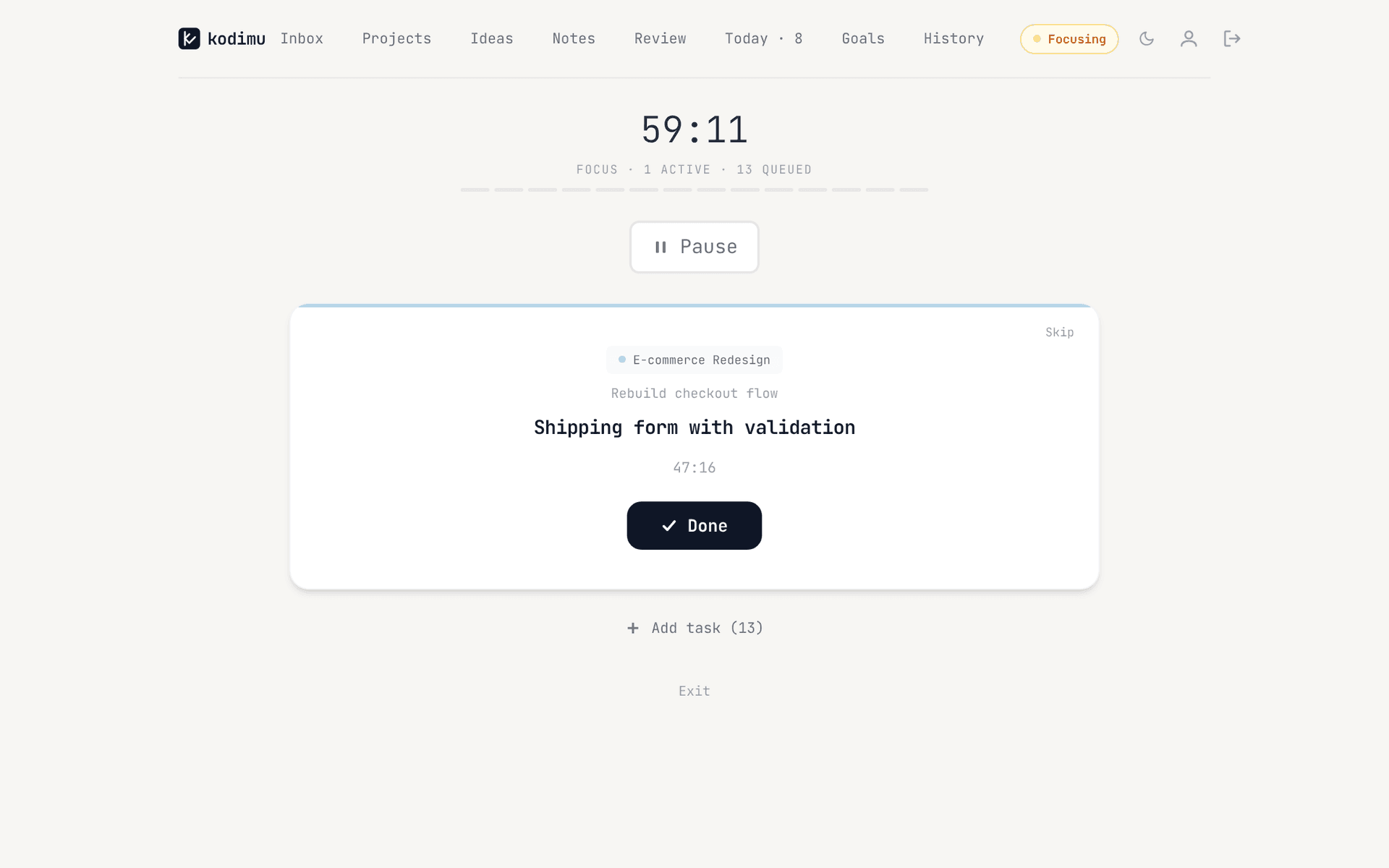
The second difference is how much of your time is measured. In Kodimu’s Focus mode a count-up stopwatch runs on the task in front of you; you can pause with a reason, run several tasks in parallel and later see in History how long each task really took, with a Monthly tab for focus time, sessions and tasks per project. Pomodoro is there as an optional mode, not the default.
Where Lunatask still shines
- Native apps on five platforms. macOS, Windows, Linux, iOS and Android, installed like any other app. Kodimu has no native apps and no offline mode.
- Much more than tasks. Its 2021 launch post already described a to-do list, notebook, habit tracker and Pomodoro timer; today it calls itself a life-tracking, journaling and notes app as well. Kodimu has notes and ideas, but no habits, no journal and no mood or life tracking.
- Audited building blocks. Its encryption rests on well-known libraries that have been audited. Kodimu’s crypto code has had no outside review.
- No analytics, by its own account. A privacy blog describes Lunatask as end-to-end encrypted with “no analytics or tracking”. Kodimu does run masked analytics.
- Community standing. Lunatask comes up again and again in Privacy Guides threads about private task managers, and one proposed ranking placed it right after Super Productivity. Kodimu is new and unknown there.
What Lunatask’s security page actually says
“We don’t have access to the private key required to decrypt your data”
That is the core end-to-end promise, and it is the same one Kodimu makes. Two outside views add context:
“… fails the notebooks section’s minimum requirements because it is not open source …”
“… metadata is not encrypted …”
Both points apply to Kodimu too: it is closed source, and its metadata is stored unencrypted. We list exactly which fields on the security page so you can compare like for like.
Moving from Lunatask to Kodimu
Kodimu has no import. You move open tasks by copy and paste into Bulk Add, which creates one task per line. Habits, journal entries and other life-tracking data have no equivalent in Kodimu.
- 1
Create your account and encryption password
Sign up and set an encryption password that differs from your login password. Download the Recovery Key in Settings and store it safely — Kodimu cannot reset the password, and there is no in-app restore screen yet.
- 2
Recreate your lists as projects
One Kodimu project per list or area you actively work on, grouped by categories with emoji icons. Loose tasks go to the Inbox.
- 3
Copy your open tasks as plain text
One task per line; sub-steps on the lines below, each starting with a dash and a space:
Book dentist appointment
Plan Japan trip
- Compare rail passes
- Reserve first hotel
- 4
Paste into Bulk Add and start timing
Paste into the project’s Bulk Add, set due dates and priority badges where needed, star today’s tasks and open Focus.
What won’t transfer automatically
- Habits, journal entries and other life-tracking data — Kodimu has no equivalent.
- Notes — you can paste them into Kodimu’s Notes page by hand, where they are encrypted too.
- Pomodoro or time history — Kodimu’s History starts when you start timing.
- Anything that relied on native-app notifications — Kodimu has no reminders or push notifications.
FAQ
- Is Lunatask end-to-end encrypted?
- Yes, according to its security docs: Lunatask says it does not have access to the private key needed to decrypt your data. Metadata is not encrypted, which is also true of Kodimu.
- Does Lunatask have a web version?
- Not yet. Its installation docs say the team is focused on native apps and that a future rewrite is meant to enable an official web app. Kodimu is a web app first.
- Is Lunatask open source?
- No, and Privacy Guides declined to list it for that reason. Kodimu is not open source either.
- Which is more private, Lunatask or Kodimu?
- Both encrypt content end to end and leave some metadata unencrypted. Lunatask uses audited libraries, ships native apps and says it runs no in-app analytics; Kodimu uses the browser’s Web Crypto API, delivers its code from the server and runs masked analytics. If those points decide it for you, Lunatask is stricter. Our private to-do apps list compares more options.
- Can I import my Lunatask tasks into Kodimu?
- No. Kodimu has no import or export yet. Copy open tasks as plain text and paste them into Bulk Add — one task per line, “- ” for subtasks.
Sources
- Lunatask — Security docs — read 2026-10-21
- Lunatask — Installation docs (platforms, web app plans) — read 2026-10-21
- Lunatask — Home page — read 2026-10-21
- Hacker News — “Lunatask: Todo list, notebook, habit tracker, and pomodoro timer (e2e encrypted)” — read 2026-10-21
- Privacy Guides forum — Lunatask nomination — read 2026-10-21
- GrapheneOS forum — Opinion on Lunatask — read 2026-10-21
- Privacy Guides forum — “Private all in one notes, reminders/tasks and calendar app?” — read 2026-10-21
- Privacy Guides forum — “Add todo list / task management tools” — read 2026-10-21
- ifeeltech — Privacy-first productivity apps — read 2026-10-21