
The Review page is where you plan your day. It shows tasks from all projects in one place, and lets you pick which ones to work on today. Most task managers make you jump between boards and views; Kodimu gives you a single screen instead.
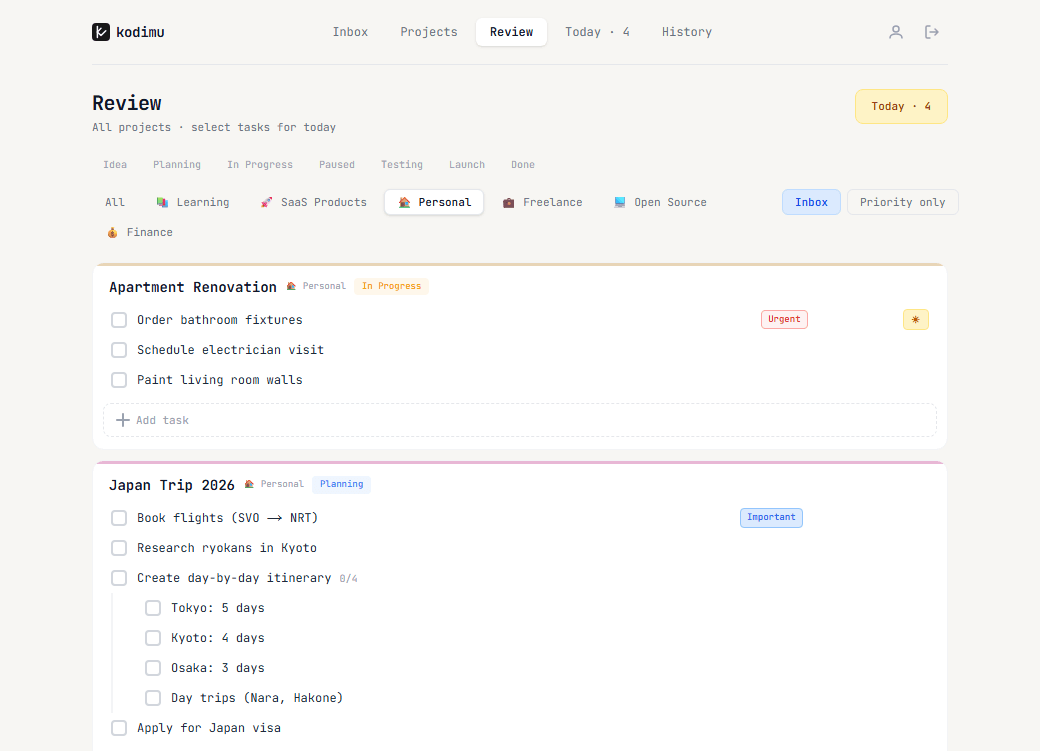
Filters
- By stage — Idea, Planning, In Progress, Paused, Testing, Launch, Done
- By category — Work, Personal, Freelance, Learning or any category you created
- Inbox — show only inbox tasks
- Priority only — show only tasks marked as Urgent or Important
Filters are remembered between visits, so your Review page opens the way you left it. Project cards can be collapsed, and you can add a task to any project right from the Review page.
Picking tasks for Today
Select a task's checkbox to add it to your Today list. The Today counter in the top-right corner updates in real time. When you are done picking, open the Today page and start a focus session.