
Super Productivity is the closest thing Kodimu has to a direct rival, and in several ways it is the stronger product. It is free, open source, runs on every desktop and phone, tracks time per task and keeps your data on your device. If you already use it happily, you probably do not need Kodimu. This page explains the narrow cases where Kodimu fits better.
Fast verdict
Side-by-side comparison
| Super Productivity | Kodimu | |
|---|---|---|
| See all tasks on one screen | Daily planner, weekly schedule and Kanban boards | Review screen: every task from every project and the Inbox, with stage and category filters |
| Real elapsed time per task | One-click time tracking per task; Pomodoro, Flowtime and timeboxing modes | Count-up timer by default, optional Pomodoro; several timers can run in parallel |
| Pauses with reasons | Not described on the pages we read | Optional reason for each pause; pause time counted separately |
| Time history | Time sheets and work summaries | History by day and monthly stats; no export or timesheets |
| Who holds the encryption key | Data stays on your device by default; Super Sync end-to-end encryption is optional | You, always: key derived from your encryption password in the browser |
| Where data is processed | On your device; Super Sync servers in Germany, or your own Dropbox/WebDAV; sync server can be self-hosted | Vercel, United States; content arrives already encrypted |
| Platforms | Linux, macOS, Windows, Android, iOS, plus a limited web version | Web app (installable PWA) only; no offline mode |
| Price | “100% free”, MIT open source | Free during beta; pricing may change; closed source |
Look at the last row twice. Super Productivity is free with no premium tier, and anyone can read its code. Kodimu is free only during beta, its client is closed source and it has not been independently audited. For a privacy tool, those are real disadvantages, and privacy communities weigh them heavily.
Local-first vs hosted end-to-end: two different promises
Both apps try to keep other people out of your tasks. They get there differently.
Super Productivity: nothing leaves your device unless you choose
By default there is no account and no server. Your tasks and time data sit in the app on your machine. If you want them on a second device, you pick a sync target: your own Dropbox or WebDAV server, or the project’s Super Sync service, where end-to-end encryption is available as an option. The upside is control. The cost is setup: you choose the sync, you set the encryption key, and you keep the apps updated on each device.
Kodimu: a hosted app where the server only sees ciphertext
Kodimu runs in the browser and stores data on a server, but task text, project names, notes, ideas and pause reasons are encrypted in your browser before upload, with a key derived from your encryption password. That encryption is mandatory — you cannot use the app until you set the password. Metadata such as due dates, timestamps, focus timings and your email is not encrypted. The upside is that there is nothing to install or configure. The cost is that you depend on a hosted service in the United States and on JavaScript delivered by that service; see the security whitepaper for the threat model and limits.
Our explainer on self-hosted, local-first and zero-knowledge hosted apps goes through this trade-off in general terms.
Where Kodimu’s workflow differs
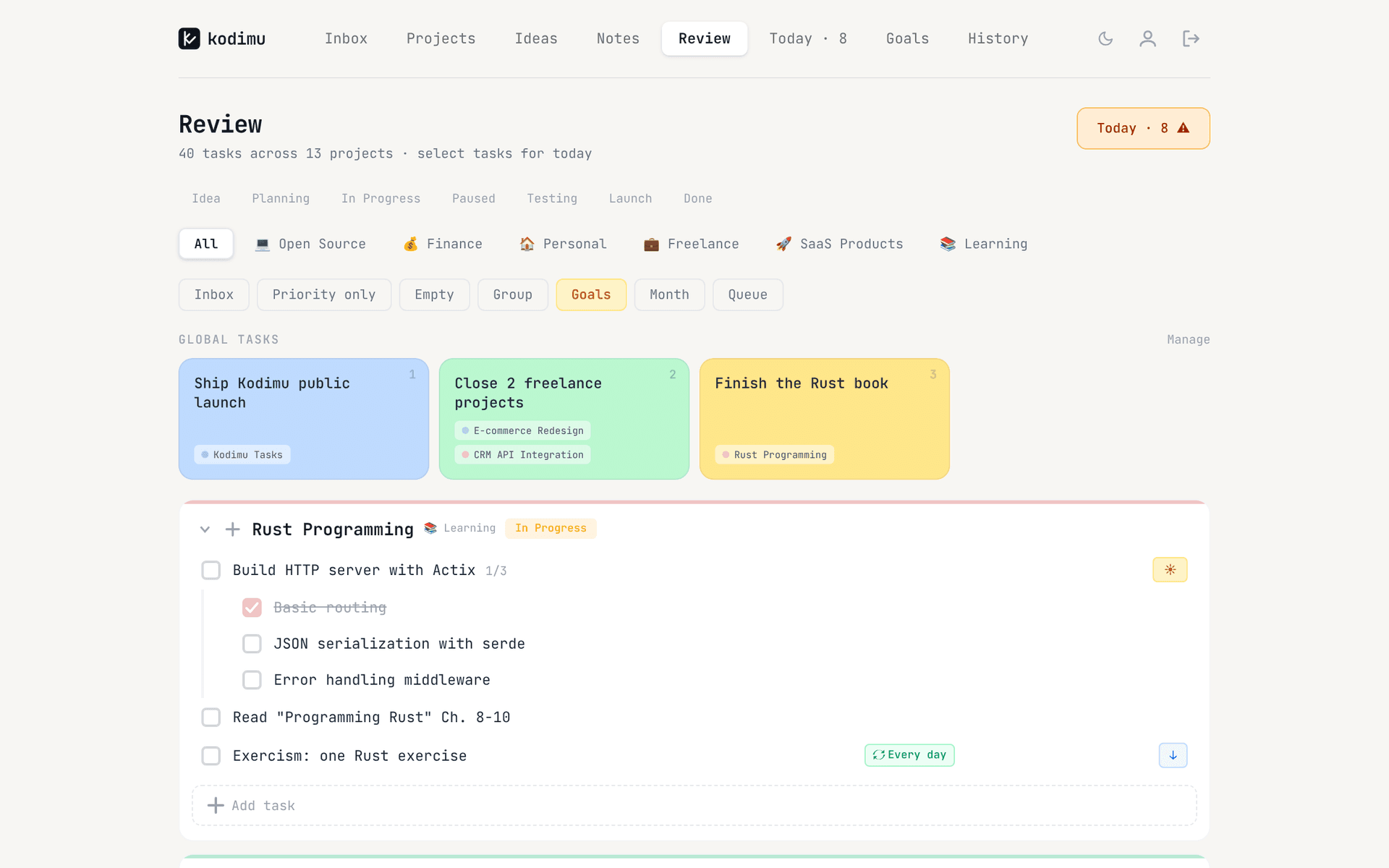
- Review across projects. One page lists every open task from every project and the Inbox, grouped by project, filterable by stage and category. Ticking a task sends it to Today. Projects have stages (Idea, Planning, In Progress, Paused, Testing, Launch, Done) that drive the filters.
- Pause reasons. When you pause Focus, you can say why. Pause time is stored apart from focus time and shows up in History.
- Parallel timers. Several tasks can run at once, each with its own clock.
- Any browser, same data. Super Productivity’s own wiki says its web version is limited — tracking only runs while the tab is open, and calendar and WebDAV sync generally fail in the browser. Kodimu is built for the browser first, though it also has no offline mode.
Where Super Productivity still shines
Honestly, in most places:
- Free and open source. MIT-licensed, around 23,000 GitHub stars, developed since 2016. You can audit it, fork it and self-host its sync server.
- Offline and native. Desktop apps for Linux, macOS and Windows and mobile apps for Android and iOS, working without a connection or an account. Kodimu needs a connection.
- Richer time features. Timesheets, work summaries, Pomodoro, Flowtime and timeboxing. Kodimu has Stopwatch and an optional Pomodoro mode, but no timesheets and no export.
- Integrations. Jira, GitHub, GitLab and Google Calendar. Kodimu has no integrations.
- No telemetry. Its privacy page says the app sends none. Kodimu uses privacy-configured PostHog analytics (masked text, no cookies) on its pages and in the app, plus Google Analytics with cookies on the public pages only (with consent in the EU/EEA, the UK and Switzerland).
- Community trust. In a Privacy Guides discussion about adding task managers, members proposed Super Productivity first. Kodimu has no such track record.
What Super Productivity’s privacy page actually says
Unlike most apps in this series, Super Productivity’s privacy page is mostly good news:
“All your data is stored locally on your device by default.”
For Dropbox and WebDAV sync: “No data passes through Super Productivity servers.” And: “Super Sync offers optional end-to-end encryption.”
“100% free. No trials, no premium tiers, no hidden costs.”
The privacy page also says Super Sync servers are in Germany. The only caveat is the word optional: if you turn on Super Sync without setting encryption, the content is not end-to-end encrypted. A Privacy Guides thread notes the app “strongly suggests an encryption masterkey for synced logs”, so the default nudges you the right way.
Moving from Super Productivity to Kodimu
Kodimu has no importer, so moving means pasting text. Move active projects only.
- 1
Choose one or two projects
Pick projects you need from different machines. Your Super Productivity data stays on your device, so nothing is lost by trying. - 2
Create the projects and set your encryption password
Give each project a stage and optional category. The encryption password is separate from your login, cannot be recovered by us. You can download a recovery key in Settings, though restoring from it is not in the app yet. - 3
Paste tasks with Bulk Add
Copy the task titles as plain text and paste them into Bulk Add: one task per line, with - in front of a line to make it a subtask of the line above.
- 4
Track a week and compare
Run Focus with pause reasons, check History and Review at the end of the week, and compare it with what Super Productivity’s timesheets gave you.
What won’t transfer automatically
- Tracked time, timesheets and work summaries — they stay in Super Productivity.
- Planned or estimated time, if you use it — Kodimu records only actual time.
- Anything beyond task titles: notes, issue links from Jira, GitHub or GitLab, and calendar data.
- Repeat rules beyond every 1, 2, 3 or 7 days.
- Anything you need offline. Kodimu also has no export yet, so think of it as a place for new work.
FAQ
- Is Super Productivity end-to-end encrypted?
- Its data stays on your device by default, so nothing leaves it unless you set up sync. Super Sync offers optional end-to-end encryption; with Dropbox or WebDAV the data goes to the provider you choose.
- Is there a Super Productivity web app?
- Yes, but its own wiki calls the browser version limited: tracking runs only while the tab is open, and calendar and WebDAV sync generally fail there. The desktop and mobile apps are the full product.
- Can I import my Super Productivity data into Kodimu?
- No. Kodimu has no importer. Paste task titles into Bulk Add, one per line, with “- ” for subtasks. Time data stays in Super Productivity.
- Is Kodimu open source like Super Productivity?
- No. Kodimu’s client is closed source and has not been audited. The encryption design is documented in the security whitepaper, but you cannot verify the code yourself.
- Which one is free?
- Super Productivity is free with no premium tier. Kodimu is free during beta; pricing may change.
Sources
- Super Productivity — Privacy — read 2026-10-21
- Super Productivity — Pricing — read 2026-10-21
- Super Productivity on GitHub (README) — read 2026-10-21
- Super Productivity wiki — Web App vs Desktop — read 2026-10-21
- Super Productivity — Press kit — read 2026-10-21
- Flathub — Super Productivity — read 2026-10-21
- Privacy Guides forum — “Super Productivity – Time Tracking App” — read 2026-10-21
- Privacy Guides forum — “Add todo list / task management tools” — read 2026-10-21