
People who look for a Todoist alternative usually want one of two things Todoist does not do on its own: count how long tasks actually take, and keep task content readable only by them. Kodimu was built around exactly those two things. Todoist is better at almost everything else, and this page says where.
Fast verdict
Side-by-side comparison
| Todoist | Kodimu | |
|---|---|---|
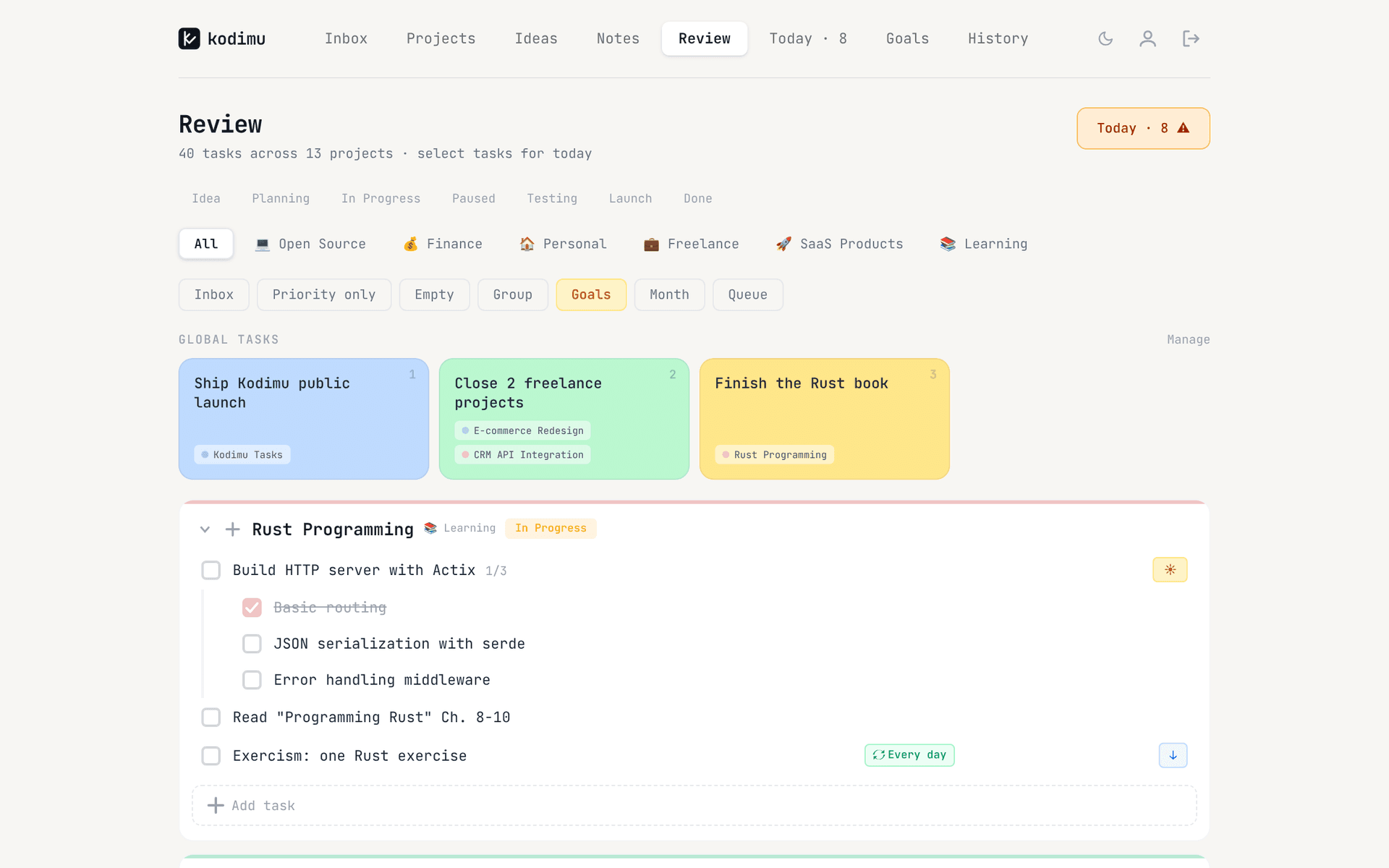
| See all tasks on one screen | Upcoming view: tasks due in the next 7 days across all projects; filters for custom views | Review screen: every task from every project and the Inbox, filtered by stage or category |
| Real elapsed time per task | No timer; a “Task duration” field on Pro, timers via integrations such as Toggl Track | Built-in count-up timer (optional Pomodoro mode); time is saved on the task |
| Pauses with reasons | Not built in | Optional reason per pause; pause time counted separately |
| Time history | Only in the reports of a connected time tracker | History by day with time per task, plus monthly stats |
| Who holds the encryption key | Todoist: encrypted at rest with keys it controls | You: key derived from your encryption password in the browser |
| Where data is processed | AWS; “employees and service providers in the U.S.” | Vercel, United States; content arrives already encrypted |
| Platforms | Web plus native desktop, mobile and watch apps | Web app (installable PWA); no native apps, no offline mode |
| Price | Beginner free (5 personal projects); Pro around $5/month billed yearly | Free during beta; pricing may change |
The table has eight rows on purpose. Todoist would win a 40-row feature checklist easily. These are the rows where the two apps actually differ for someone who wants time data and privacy.
Time tracking: a duration field vs a running timer
Todoist’s own answer to time is a Task duration field on the Pro plan. It is useful for planning — “this takes 30 minutes” — but it is a number you type, not a measurement. Super Productivity’s Todoist comparison makes the same point in its FAQ, and the whole first page of results for “todoist time tracking” consists of time-tracker vendors selling an integration.
Those integrations work. Toggl Track, for example, lets you “start and stop a timer from inside Todoist in Chrome, Firefox, or Edge”. The trade-off is that your tasks now live in two services, the timer only appears where the extension is installed, and your time history sits in the tracker’s account rather than next to the task.
In Kodimu the timer is part of the task manager:
- Focus mode runs a count-up stopwatch by default; a Pomodoro mode with work and break cycles is available if you prefer it. Either way the real time lands on the task.
- Pause with a reason. “Client call”, “lunch”, “blocked by review” — pause time is stored separately from focus time, so interruptions become visible instead of silently inflating a task.
- Parallel timers. Several tasks can run at once, each with its own clock, for the days when you wait on one thing while doing another.
- History. Completed tasks are logged by day with focus time, pause time and sessions; a monthly tab shows totals, time per project and your busiest day.
Kodimu does not have time estimates, so you cannot compare planned against actual inside the app. Our guide to time tracking in Todoist covers the integration route in more detail.
Where Todoist still shines
Todoist is a mature product, and for many people it is the right one. Specifically:
- Native apps everywhere. Desktop apps for Mac and Windows with a global Quick Add shortcut, phone widgets, Apple Watch and Wear OS. Kodimu is a browser app with no offline mode.
- Fast capture with natural language. Typing “every other Thursday” or “tomorrow at 10” into Quick Add sets the date. Kodimu has due dates and four simple repeat intervals, but no date parsing.
- Working with others. Shared projects and team plans. Kodimu has no sharing, assignees or comments at all.
- Integrations. Todoist’s pricing page advertises 90+ integrations, including the time trackers above. Kodimu has no integrations and no public API.
- Reminders and labels. Kodimu has neither, and it has no file attachments.
- Track record. Todoist has been around for years; its compare page cites a SOC 2 Type II report. Kodimu is a beta built by one developer, closed source and not independently audited.
What Todoist’s security page actually says
Todoist describes encryption in transit and at rest:
“We use TLS 1.2 and 1.3 secure channels …” and “Projects, tasks, comments, account information, and payment information are all stored and encrypted at rest.”
“We use Amazon Web Services (AWS) servers to host all user data.”
“Your Information will be processed by our employees and service providers in the U.S.”
The page does not mention end-to-end encryption and does not say who holds the at-rest keys — by architecture, Todoist does, because its servers decrypt your tasks to show them to you. That is normal for mainstream apps and not a sign of misconduct; it is simply a different promise. We go through it in detail in Does Todoist encrypt your tasks?
In Kodimu, task text, project names, notes, ideas and pause reasons are encrypted in the browser with AES-256-GCM before upload, using a key derived from a separate encryption password. Due dates, timestamps, priorities, stages and your email are not encrypted. The security whitepaper lists every field.
Moving from Todoist to Kodimu
Kodimu has no importer. Migration is copy and paste, which is quicker than it sounds if you move active work only.
- 1
Pick what is worth moving
Choose the projects you actively work on. Completed tasks, someday lists and shared projects can stay in Todoist. - 2
Create the projects in Kodimu
Give each a name, color, stage (Idea, Planning, In Progress and so on) and optionally a category. Then set your encryption password; it is separate from your login and cannot be recovered by us. - 3
Paste tasks with Bulk Add
Copy the task titles from a Todoist project as plain text and paste them into Bulk Add: one task per line. A line starting with - becomes a subtask of the line above.
- 4
Run both for a week
Star a few tasks for Today, start Focus, pause with a reason when you get interrupted, and look at History at the end of the week. Keep Todoist open for anything Kodimu does not cover.
What won’t transfer automatically
- Due dates and recurring rules — set them again; Kodimu repeats every 1, 2, 3 or 7 days only.
- Labels, filters, reminders, comments and attachments — Kodimu has no equivalents.
- Shared projects and collaborators.
- Time logged in Toggl or another tracker — it stays in that tool.
- Your completed-task history. Kodimu also has no export yet, so treat it as a place for new work.
FAQ
- Is Todoist end-to-end encrypted?
- No. Todoist encrypts data in transit (TLS 1.2 and 1.3) and at rest on AWS, with keys it controls. Its security page does not mention end-to-end encryption.
- Does Todoist have built-in time tracking?
- Not a timer. Pro has a task duration field for planning; to measure time you connect a tracker such as Toggl Track, Clockify or Everhour.
- Can I import my Todoist tasks into Kodimu?
- Not automatically. Kodimu has no importer; you paste task titles into Bulk Add, one per line, with “- ” for subtasks. Dates, labels and comments have to be redone by hand.
- Does Kodimu have a mobile app?
- No. Kodimu is a web app you can install as a PWA, and it needs a connection. Todoist’s native apps are clearly better on phones.
- Is Kodimu free?
- Kodimu is free during beta; pricing may change. Todoist has a free Beginner plan and a paid Pro plan at around $5 a month billed yearly (checked on 21 Oct 2026).
Sources
- Todoist — Security — read 2026-10-21
- Todoist — Privacy policy — read 2026-10-21
- Todoist — Pricing — read 2026-10-21
- Todoist Help — Todoist Pro pricing update in 2025 — read 2026-10-21
- Todoist Help — Use Task Quick Add in Todoist — read 2026-10-21
- Todoist Help — Upcoming view — read 2026-10-21
- Todoist — Compare — read 2026-10-21
- Todoist Integrations — Toggl Track — read 2026-10-21
- Super Productivity — Todoist vs Super Productivity — read 2026-10-21
- Time Doctor — Tools for Todoist time tracking — read 2026-10-21