
Todoist is very good at capturing and organising tasks. What it does not do is tell you how long those tasks took. If you search for “Todoist time tracking”, the whole first page is time-tracker vendors selling an integration — which is a fair sign that the feature is not in the app itself.
Todoist’s own integrations directory makes the point. Its listing for Toggl Track says the extension lets you:
“start and stop a timer from inside Todoist in Chrome, Firefox, or Edge.”
That works, but it means a second account, a second app holding your task names, and a timer in a browser extension. Todoist Pro’s “Task duration” field is a planned length, not a record of what happened. This page is for people who want the timer in the same place as the tasks.
How we evaluated
We looked at each tool through the same five questions, using the vendors’ own pages wherever possible:
- Built-in timer. Does the app itself record time against a task, without an integration? Stopwatch, Pomodoro or both? Is the time kept per task afterwards?
- Encryption model. Who holds the key: the vendor (encryption in transit and at rest) or only you (end-to-end)? See our explainer on the difference.
- Platforms. Native mobile and desktop apps, web, offline.
- Price. Free tier, subscription or one-time, as listed by the vendor.
- Export. Can you get your tasks and time back out? Todoist itself exports a project as CSV (completed tasks are not included), so this is the bar.
All facts were checked on 21 October 2026. Prices and plan limits change; check the vendor’s page before you commit. Kodimu is our product, and we describe it by the same criteria as the others.
Quick picks
| Tool | Best for | Pricing model | Encryption | Main trade-off |
|---|---|---|---|---|
| Super Productivity | Free, open-source tasks + time sheets | Free, no paid tier | Local-first; optional end-to-end encrypted sync | Desktop-first; you choose and run sync |
| TickTick | Closest Todoist-style app with a timer | Free tier; Premium US$49.99/yr | In transit + at rest, vendor-held keys | Focus sessions, not a per-task time log |
| Amazing Marvin | Detailed per-task timing and focus mode | US$8/mo or US$96/yr, no free plan | HTTPS; at rest not stated | No free plan |
| Sunsama | Guided daily planning with actual vs planned time | From around US$17–22/mo, no free plan | TLS 1.2+; AES-256 at rest, vendor-held | Most expensive here |
| ClickUp | Teams that need tracking inside projects | Free Forever; tracking included from Core (US$9/user/mo yearly) | TLS 1.2; AES-256 at rest, vendor-held | Heavy for a personal list |
| Lunatask | End-to-end encryption in native apps | Free plan; paid Premium | End-to-end; metadata not encrypted | No web app; closed source |
| Kodimu | Encrypted tasks + real time per task in the browser | Free during beta; pricing may change | End-to-end, always on; metadata not encrypted | Web only; no import, export or integrations |
The seven tools
The order follows how close each tool is to a Todoist-style list with a timer, not a ranking. Toggl Track and Clockify are missing on purpose: they are time trackers, the integration route this page tries to avoid. Akiflow (time blocking) and Motion (AI auto-scheduling) plan time on a calendar rather than record how long a task really took, and reviews put both at roughly US$19–34 a month.
Super Productivity
Free, open source, local-first- Timer
- Time tracking, Pomodoro, Flowtime, countdown
- Platforms
- Windows, macOS, Linux, Android, iOS, browser
- Price
- Free
- Encryption
- Local; optional E2EE sync
What makes it stand out
The most complete free answer to “Todoist, but with time tracking”. Its README describes it as a todo app with “timeboxing & time tracking capabilities”: you track time on tasks, then create time sheets and work summaries to export to another system. Focus mode offers Pomodoro, Flowtime and countdown sessions.
Data stays on your device by default. Sync is optional, via Dropbox, WebDAV or its own SuperSync service (servers in Germany), which offers end-to-end encryption and can be self-hosted. It is MIT-licensed, needs no account and, per its pricing page, has “no trials, no premium tiers”.
The catch
It is built as a desktop and mobile app first; the web version has documented limitations. Sync is something you set up and choose, not a hosted service that just works, and end-to-end encryption applies to SuperSync rather than being a property of every setup. The interface is dense with options — great if you like to tune, less so if you want Todoist-level simplicity.
TickTick
Todoist-style lists with a Focus timer- Timer
- Stopwatch + Pomodoro (Focus)
- Platforms
- All major platforms
- Price
- Free; Premium US$49.99/yr
- Encryption
- At rest, vendor-held keys
What makes it stand out
The smallest step from Todoist. TickTick added a stopwatch to Focus “to enable you to easily track the time spent on the task”, alongside Pomodoro, and Focus Statistics show how much time went into different tasks. A 2026 review notes that Focus is available on both the free and Premium plans. You also get a calendar, habits and an Eisenhower matrix.
The catch
Focus is organised around sessions and statistics. What it does not give you is pause reasons, several timers running in parallel, or a running record of elapsed time per task that you can read back later. On privacy, TickTick says data is “stored and encrypted at rest” on AWS in the United States — keys are held by TickTick, and the privacy policy says it uses third-party AI providers to process inputs. The free plan is capped at 9 lists and 99 tasks per list. More in TickTick time tracking.
Amazing Marvin
Task-level tracking and Super Focus Mode- Timer
- Per-task tracking, Pomodoro, Super Focus Mode
- Platforms
- Web, Mac, Windows, iOS, Android
- Price
- US$8/mo or US$96/yr
- Encryption
- HTTPS; at rest not stated
What makes it stand out
Marvin’s home page promises to “track exactly how long you spend on each task”, and it delivers: time tracking can start automatically when you enter Super Focus Mode, which hides everything but the current task, with a session timer and an estimate-based progress bar. There is a built-in Pomodoro with adjustable intervals. Few apps on this list put as much attention on the timing of individual tasks.
The catch
No free plan — US$8 a month or US$96 a year after a 14-day trial. The privacy page says “All connections use HTTPS encryption” but does not describe encryption at rest; account data sits on Google App Engine and app data on IBM Cloudant, regions not stated. There is no cheaper tier to start on. See Amazing Marvin vs Kodimu.
Sunsama
Guided daily planning- Timer
- Task timer, planned vs actual time
- Platforms
- Web, macOS, Windows, Linux, iOS, Android
- Price
- Around US$17–22/mo
- Encryption
- TLS 1.2+, AES-256 at rest
What makes it stand out
Sunsama’s user manual explains that the task timer saves timed minutes as actual time on the task, next to the planned time, and the full task card shows cumulative totals across sessions. The focus bar can switch between a count-up view and a Pomodoro countdown. Around it sit daily planning, a daily shutdown ritual, weekly objectives and timeboxing.
The catch
It is the most expensive option here: Pro is listed at US$17 a month billed yearly or US$22 monthly (its FAQ showed a different figure on the same day), and Sunsama “doesn’t have a free forever plan”. Data is hosted on Google Cloud, and “All data is stored in the United States”, with vendor-held keys. See Sunsama vs Kodimu.
Kodimu
Our app: end-to-end encrypted web app with real time per task- Timer
- Stopwatch (default) or Pomodoro; pauses with reasons
- Platforms
- Web / installable PWA
- Price
- Free during beta
- Encryption
- End-to-end, always on
What makes it stand out
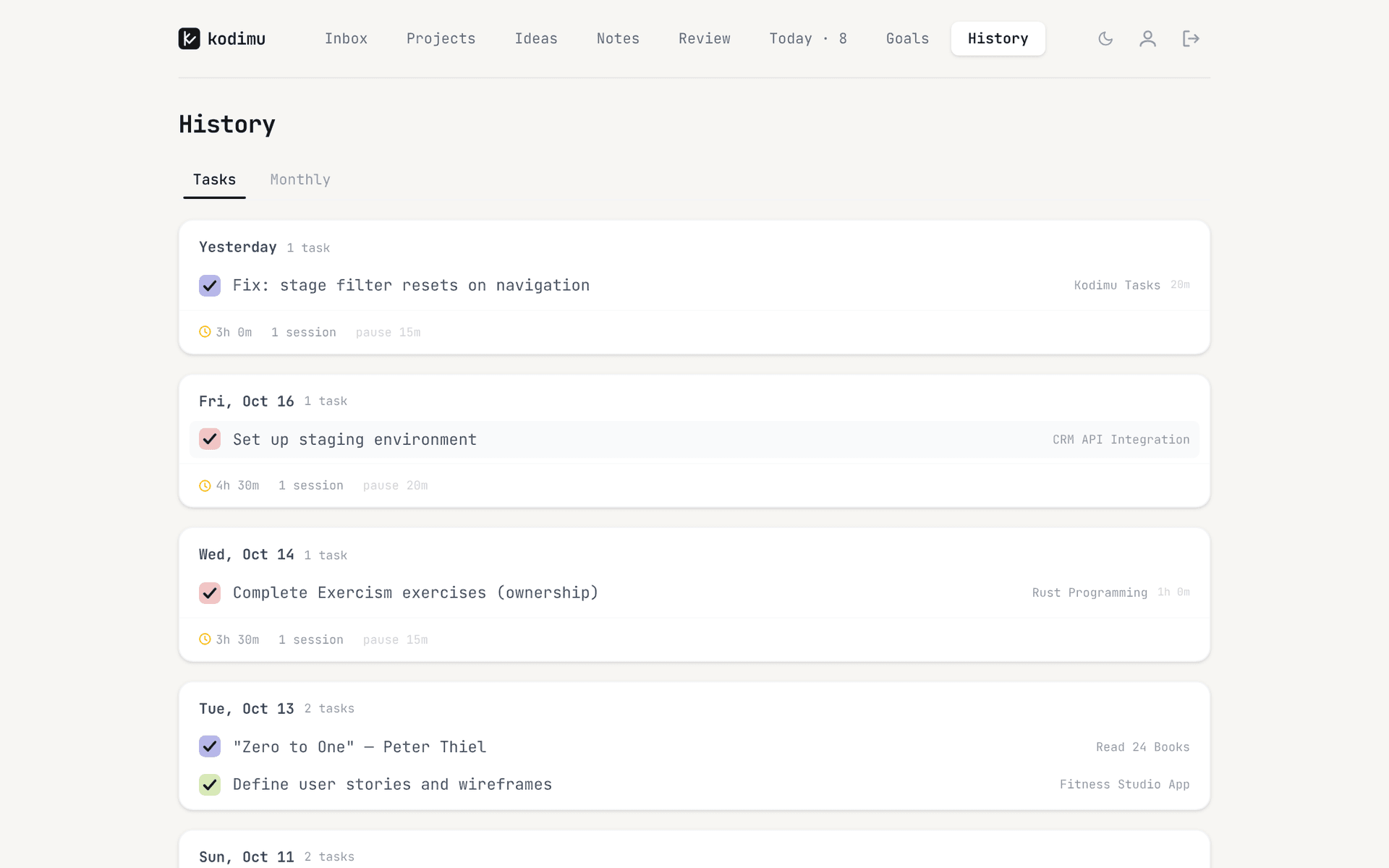
Focus mode records the real time spent on each task: a count-up Stopwatch by default, or an optional Pomodoro mode with work and break cycles. You can pause with a reason, and pause time is counted separately from focus time. Several tasks can run in parallel, each with its own timer. History lists completed tasks with the time each took, plus monthly totals. A Review screen shows every task from every project at once.
Task text, project names, notes and pause comments are encrypted in your browser with AES-256-GCM before upload; the key comes from a separate encryption password and the server never sees it. Details on the security page.
The catch
Kodimu is a beta from a single developer. It has no native mobile apps and no offline mode, no calendar, no reminders, no integrations, no collaboration and no time estimates. There is no import from Todoist and no export of tasks or time yet. It is hosted on Vercel in the United States; metadata such as due dates, timestamps and focus timings is not encrypted. The client is closed source and has not been audited. If you lose your encryption password and recovery key, your data cannot be recovered.
ClickUp
Project management with native tracking- Timer
- Native time tracking (trial on Free)
- Price
- Free Forever; Core US$9/user/mo yearly
- Encryption
- TLS 1.2, AES-256 at rest
What makes it stand out
ClickUp has its own time tracking, not an add-on: its pricing page lists it as a trial on the Free Forever plan and included from Core upwards, with advanced tracking on the top tiers. If your “Todoist” is really a team project list, time and tasks stay in one tool.
The catch
It is a project-management platform, and it feels like one for a personal list. Full time tracking needs a paid seat. Data is encrypted at rest with AES-256 on AWS with keys ClickUp controls; data residency choices are an Enterprise feature.
Lunatask
End-to-end encrypted, native apps- Timer
- Task-bound Pomodoro timers
- Platforms
- macOS, Windows, Linux, iOS, Android
- Price
- Free plan; paid Premium
- Encryption
- End-to-end
What makes it stand out
The other end-to-end encrypted option here. Lunatask says “We don’t have access to the private key required to decrypt your data”, and Privacy Guides members note it is built on audited libraries (TweetNaCl, libsodium). Its timers always run for a specific task and sync across devices. It combines tasks with habits, a journal and notes, and has a free plan.
The catch
There is no web app — its installation docs say the team is focusing on native apps. It is closed source, which is why Privacy Guides declined to list it, and metadata is not encrypted. The timers are countdowns; we could not confirm from its docs whether elapsed time is kept as a per-task log. See Lunatask vs Kodimu.
Which should you choose
- You want to stay close to Todoist and keep native apps everywhere → TickTick. Accept that Focus gives you sessions and statistics rather than a detailed per-task log.
- You want free and open source, and you are fine running your own sync → Super Productivity. It is the most generous option on this list.
- You want a planner that compares planned with actual time and you will pay for polish → Sunsama, or Amazing Marvin if you prefer to build your own system.
- Your tasks live in a team workspace → ClickUp on a paid plan.
- You want end-to-end encryption in native mobile and desktop apps → Lunatask.
- You want end-to-end encryption in the browser and a real record of time per task → Kodimu, as long as web-only, no integrations and no export are acceptable during the beta.
- You rely on Todoist’s integrations, natural-language dates and shared projects → stay with Todoist and add a tracker. Our Todoist time tracking guide compares the integrations.
How to recreate your Todoist workflow in Kodimu
There is no importer, so move one project at a time: export the project from Todoist as CSV, copy the task column, and paste it into a Kodimu project with Bulk Add — one task per line, and a line starting with “-” becomes a subtask of the line above. Recreate Todoist priorities with Kodimu’s three badges (Priority, Important, Urgent). Instead of filters, open Review to see every task from every project on one screen and tick the ones for today; they land on Today. Start a task in Focus with the Stopwatch or the optional Pomodoro mode, pause with a reason when you get interrupted, and check History at the end of the week to see where the time really went.
FAQ
- Does Todoist have built-in time tracking?
- No. Todoist Pro has a “Task duration” field for planning, and time tracking is offered through integrations such as Toggl Track, Clockify, Everhour and Time Doctor.
- What is the best free Todoist alternative with time tracking?
- Super Productivity is free with no paid tier, open source and has full time tracking with time sheets. TickTick’s Focus timer is also available on its free plan. Kodimu is free during its beta, but pricing may change.
- Which Todoist alternative is end-to-end encrypted?
- Lunatask and Kodimu encrypt content end-to-end; Super Productivity does so when you sync through SuperSync. Todoist, TickTick, Sunsama, ClickUp and Amazing Marvin do not. See private to-do apps.
- Can I import my Todoist tasks into Kodimu?
- Not automatically. Export each Todoist project as CSV and paste the task names into Bulk Add. Comments, labels, attachments and completed tasks will not come across.
- Is TickTick’s Focus timer real time tracking?
- It records focus sessions with a stopwatch or Pomodoro and shows statistics per task, without pause reasons or parallel timers.
Sources
- Todoist — Toggl Track integration — read 2026-10-21
- Todoist — Pricing — read 2026-10-21
- Todoist Help — Import or export a project as a CSV file — read 2026-10-21
- Time Doctor — Tools for Todoist time tracking — read 2026-10-21
- Super Productivity — README on GitHub — read 2026-10-21
- Super Productivity — Privacy — read 2026-10-21
- Super Productivity — Pricing — read 2026-10-21
- TickTick blog — Brand-new Focus experience — read 2026-10-21
- ClickUp — TickTick review — read 2026-10-21
- TickTick — Upgrade / pricing — read 2026-10-21
- TickTick — Security — read 2026-10-21
- TickTick — Privacy policy — read 2026-10-21
- Amazing Marvin — Home — read 2026-10-21
- Amazing Marvin — Focus features — read 2026-10-21
- Amazing Marvin — Pricing — read 2026-10-21
- Amazing Marvin — Privacy — read 2026-10-21
- Sunsama User Manual — Planned and actual times — read 2026-10-21
- Sunsama — Pricing — read 2026-10-21
- Sunsama — Security / IT approval — read 2026-10-21
- ClickUp — Pricing — read 2026-10-21
- ClickUp — Security — read 2026-10-21
- Lunatask — Security — read 2026-10-21
- Lunatask — Timers — read 2026-10-21
- Lunatask — Installation — read 2026-10-21
- Privacy Guides forum — Lunatask — read 2026-10-21
- Toolfinder — Akiflow vs Sunsama — read 2026-10-21
- Akiflow — Pricing — read 2026-10-21
- TechRepublic — Motion review — read 2026-10-21