
Sunsama is a daily planner built around a ritual: pull in tasks, place them on your calendar, work through the day, shut down. People who leave it usually name the price. Kodimu is not a cheaper Sunsama — it has no calendar at all — but it covers the other half of the job: measuring how long the work really took, and keeping the task text private.
Fast verdict
Side-by-side comparison
| Sunsama | Kodimu | |
|---|---|---|
| See all tasks on one screen | Today view with daily planning and weekly objectives | Review screen: every task from every project and the Inbox, with stage and category filters |
| Real elapsed time per task | Focus mode with a timer (per third-party reviews); planning centres on timeboxes | Count-up timer by default, optional Pomodoro; time saved on the task; parallel timers |
| Pauses with reasons | Not described on the pages we read | Optional reason for each pause; pause time counted separately |
| Time history | Not confirmed on Sunsama’s pages we read; a Toggl integration is listed | History of completed tasks by day with time per task; monthly stats |
| Who holds the encryption key | Sunsama: TLS 1.2+ in transit, encrypted at rest under MongoDB Atlas standards | You: key derived from your encryption password in the browser |
| Where data is processed | Google Cloud Platform; “All data is stored in the United States” | Vercel, United States; content arrives already encrypted |
| Platforms | iOS/iPadOS, Android, macOS, Windows, Linux and web | Web app (installable PWA); no native apps, no offline mode |
| Price | Around $17/month billed yearly ($22 month to month); 14-day trial; no free plan | Free during beta; pricing may change |
Planning time vs measuring it
Sunsama’s strength is deciding when to do things. You estimate, you timebox, the calendar fills up, and the shutdown ritual stops the day from sprawling. That is valuable, and it is the reason many people pay for it.
What a plan cannot tell you is how long the work actually took. That gap shows up in Sunsama’s own public roadmap, where users have asked to “track actual time separately from estimated time”. Third-party reviews do credit Sunsama with a focus mode and timer, so this is a question of emphasis rather than a missing feature.
Kodimu is built the other way around:
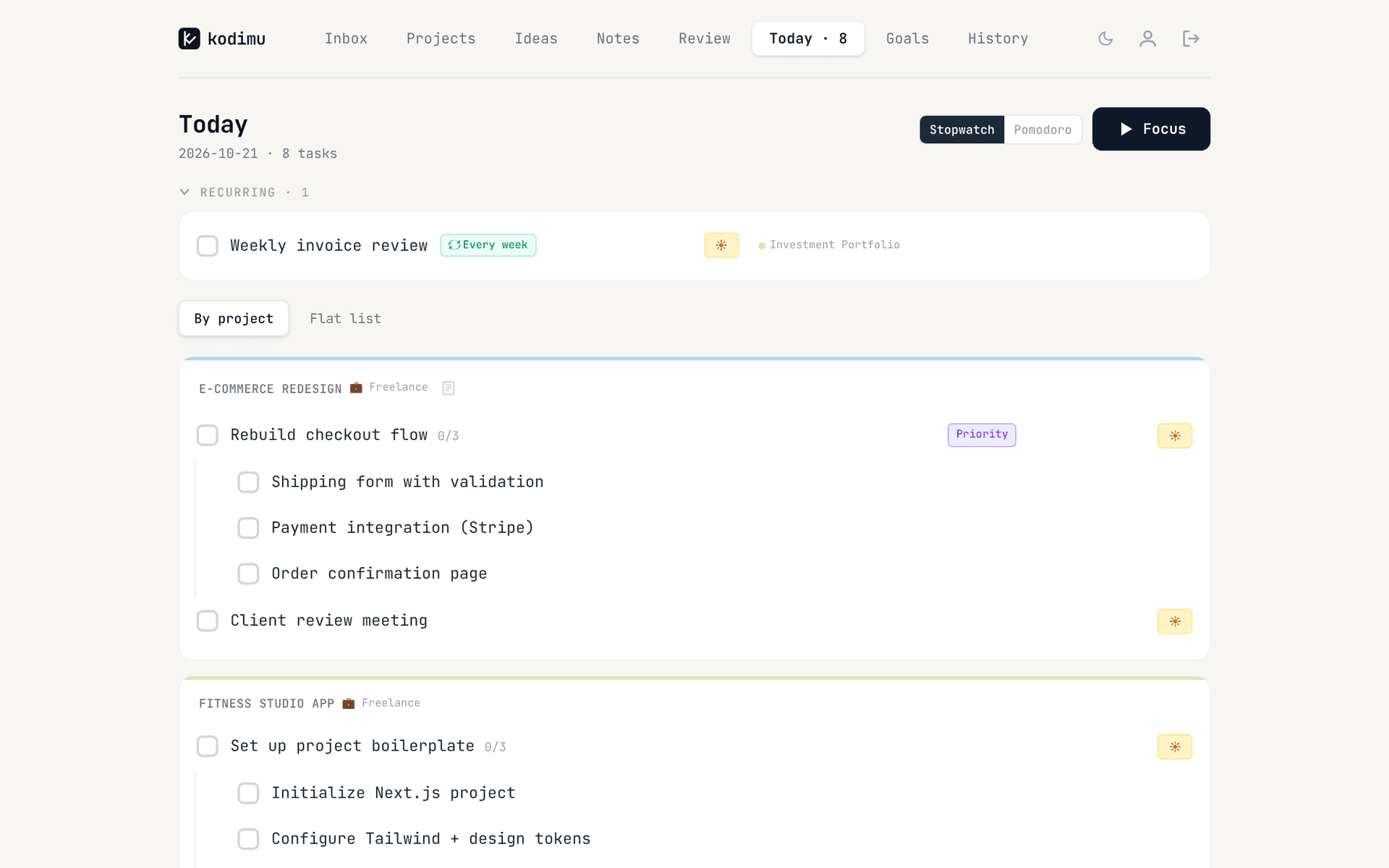
- Today is a short list of starred tasks, with a daily summary of tasks done, total focus time and number of sessions.
- Focus runs a count-up stopwatch (or an optional Pomodoro cycle). You can pause with a reason, and pause time is kept apart from focus time. Several tasks can run in parallel.
- History lists what you finished each day and how long each task took; the monthly view adds time per project and your busiest day.
- Review shows every open task across all projects, so the daily “what next” choice happens on one page rather than across a calendar.
Kodimu has no time estimates, so it will not compare planned against actual for you; it just gives you the actual. Our guide to estimated vs actual time explains how to use those numbers to plan better.
Where Sunsama still shines
- Calendar integration. Two-way sync with Google and Outlook calendars, plus iCloud. Timeboxing a task puts it on your real calendar. Kodimu has no calendar view, no time blocking and no calendar sync.
- The daily ritual. Sunsama’s own comparison pages list daily planning, daily shutdown, weekly objectives, a Today view, focus mode, timeboxing and email forwarding. It is a method, not just an app.
- Apps on every platform. iOS, iPadOS, Android, macOS, Windows, Linux and web. Kodimu is browser-only and needs a connection.
- Integrations. Sunsama’s pricing page lists integrations, Toggl among them. Kodimu has none, and no import.
- A company behind it. Sunsama’s security documentation describes a penetration test, backup policy and SOC 2 work (see below). Kodimu is a single-developer beta, closed source and not audited.
What Sunsama’s security page actually says
“All data in transit is encrypted using industry-standard TLS 1.2+.” … “Our servers and database are hosted on GCP … All data is stored in the United States.”
For data at rest the same page refers to “MongoDB Atlas’ encryption standards” (AES-256). It does not mention end-to-end encryption, so Sunsama’s systems can read task content — which they also need to do to sync it with your calendar and other tools.
One detail worth knowing: two versions of Sunsama’s security documentation, both dated 4 December 2025, disagree about SOC 2. One says a “SOC2 Type II Report” is available; the other lists current certifications as “None at this time” with an audit in progress. If you need the report, ask Sunsama directly.
Kodimu encrypts task text, project names, notes, ideas and pause reasons in the browser with AES-256-GCM. Due dates, timestamps, focus timings and your email are not encrypted. See the security whitepaper.
Moving from Sunsama to Kodimu
Kodimu has no importer. You paste task titles in, which works well for an active backlog.
- 1
Collect your backlog
List the open tasks you still care about, grouped by the project or channel they belong to. Scheduled calendar blocks can stay where they are. - 2
Create projects in Kodimu
One project per area of work, each with a stage and optional category. Set your encryption password; it is separate from your login and cannot be recovered by us. - 3
Paste with Bulk Add
Paste the tasks into Bulk Add, one task per line. A line starting with - becomes a subtask of the task above. Unsorted items can go to the Inbox and still appear on Review.
- 4
Plan in Sunsama, measure in Kodimu, for one week
Star the day’s tasks for Today, run Focus, pause with reasons, and compare History with your Sunsama timeboxes at the end of the week.
What won’t transfer automatically
- Calendar events and timeboxes — Kodimu has no calendar.
- Time estimates, daily plans, shutdown notes and weekly objectives.
- Tasks pulled in from integrations, plus their links back to the source tool.
- Due dates and repeat rules — re-enter them; Kodimu repeats every 1, 2, 3 or 7 days.
- Any history. Kodimu also has no export yet.
FAQ
- Does Sunsama have a free plan?
- No. Sunsama says it “doesn’t have a free forever plan”; there is a 14-day trial, then around $17 a month billed yearly or $22 month to month (checked on 21 Oct 2026).
- Is Sunsama end-to-end encrypted?
- No. Its security documentation describes TLS 1.2+ in transit and encryption at rest on MongoDB Atlas, with data stored on Google Cloud in the United States.
- Can Kodimu sync with Google Calendar like Sunsama?
- No. Kodimu has no calendar view, no time blocking and no calendar integrations. If calendar sync is essential, Kodimu is not a Sunsama replacement.
- Can I import my Sunsama tasks into Kodimu?
- Not automatically. Paste task titles into Bulk Add, one per line, with “- ” for subtasks.
- Does Kodimu have a mobile app?
- No. It is a web app you can install as a PWA, with no offline mode. Sunsama’s native apps are better on phones.
Sources
- Sunsama — Pricing — read 2026-10-21
- Sunsama Help — IT approval — read 2026-10-21
- Sunsama Help — Security overview — read 2026-10-21
- Sunsama Help — Calendar integration — read 2026-10-21
- Sunsama — Alternative to Todoist (feature table) — read 2026-10-21
- Sunsama roadmap — Track actual time separately from estimated time — read 2026-10-21
- Toolfinder — Akiflow vs Sunsama — read 2026-10-21
- Super Productivity — Best Sunsama alternatives 2026 — read 2026-10-21