
Sunsama is a calm, well-made daily planner, and its task timer records actual time next to planned time. The reason most people look elsewhere is the bill. Pro is listed at US$17 a month billed yearly or US$22 billed monthly, and there is no way to stay on a free tier.
“Sunsama doesn’t have a free forever plan.”
Competitor round-ups name the same reason first: Upbase calls a price of around US$20 a month “high”, and Super Productivity’s guide talks about “subscription cost fatigue”. Even Sunsama’s own pages disagreed on the day we checked — its FAQ showed a higher figure than the pricing table — so treat “around US$17–22 a month” as the honest range. This page lists planners that cost less, or nothing, and still record how long your tasks really take.
How we evaluated
The same five questions for every tool, answered from vendor pages where possible:
- Built-in timer. Does it record the real time spent on a task — not just a planned block on a calendar? Sunsama’s planned-versus-actual view sets the bar.
- Price. The yearly cost for one person, and whether a free plan exists.
- Encryption model. Vendor-held keys or end-to-end. Sunsama encrypts with TLS 1.2+ in transit and AES-256 at rest on MongoDB Atlas, with keys it controls, and stores all data in the United States.
- Platforms. Sunsama runs on web, macOS, Windows, Linux, iOS and Android, so this matters.
- Export. Whether your tasks and time can come back out.
Checked on 21 October 2026. Kodimu is our product and is judged by the same criteria; it is not placed first.
Quick picks
| Tool | Best for | Pricing model | Encryption | Main trade-off |
|---|---|---|---|---|
| Super Productivity | Free daily planning with time sheets | Free, no paid tier | Local-first; optional end-to-end encrypted sync | Desktop-first; set up sync yourself |
| TickTick | Cheap all-rounder with a Focus timer | Free tier; Premium US$49.99/yr | At rest, vendor-held keys | Sessions and stats, not planned vs actual |
| Amazing Marvin | Closest paid feature set, much cheaper | US$8/mo or US$96/yr | HTTPS; at rest not stated | No free plan |
| Kodimu | Free, encrypted, real time per task | Free during beta; pricing may change | End-to-end, always on; metadata not encrypted | No calendar; web only |
| Lunatask | Encrypted planner with habits and timers | Free plan; paid Premium | End-to-end; metadata not encrypted | No web app |
| Toggl Track | Time first, light task planning | Free plan; Starter US$9/user/mo yearly | TLS; at rest not stated | A tracker, not a planner |
| ClickUp | Teams that plan and track in one tool | Free Forever; tracking from Core (US$9/user/mo yearly) | TLS 1.2; AES-256 at rest, vendor-held | Heavy for one person |
What one person pays for a year, at the prices listed on 21 October 2026:
| Tool | Cheapest way to pay | Per year |
|---|---|---|
| Sunsama | Pro, billed yearly | US$204 |
| Amazing Marvin | Yearly plan | US$96 |
| TickTick | Premium, yearly | US$49.99 (free tier available) |
| ClickUp | Core, billed yearly | US$108 (free tier with trial tracking) |
| Toggl Track | Free plan | US$0 |
| Lunatask | Free plan | US$0 |
| Super Productivity | Free | US$0 |
| Kodimu | Free during beta | US$0 (pricing may change) |
The seven tools
Super Productivity
Free, open source, local-first- Timer
- Time tracking, Pomodoro, Flowtime
- Platforms
- Windows, macOS, Linux, Android, iOS, browser
- Price
- Free
- Encryption
- Local; optional E2EE sync
What makes it stand out
The most complete free replacement. Its README describes a planner that lays out your day on a schedule timeline next to calendar events, timeboxing and time tracking, plus time sheets and work summaries. Focus mode offers Pomodoro, Flowtime and countdown sessions, and a break reminder. Pricing is simple: “100% free. No trials, no premium tiers”. It is MIT-licensed, works without an account and keeps data on your device unless you sync.
The catch
It is desktop- and mobile-first, and the web version has limitations. Sync is something you configure (Dropbox, WebDAV or SuperSync, which has optional end-to-end encryption). There is no guided planning-and-shutdown ritual of the Sunsama kind; you get the tools and build the habit.
TickTick
Low price, lots of features- Timer
- Stopwatch + Pomodoro (Focus)
- Platforms
- All major platforms
- Price
- Free; Premium US$49.99/yr
- Encryption
- At rest, vendor-held keys
What makes it stand out
A quarter of Sunsama’s yearly price, with a calendar view, habits and a Focus mode that has both a stopwatch and Pomodoro. Focus Statistics show how much time went into different tasks, and a 2026 review notes Focus works on the free plan as well as Premium.
The catch
Focus records sessions and statistics rather than a planned-versus-actual comparison per task, and it does not keep pause reasons or run timers in parallel. The free plan is capped at 9 lists and 99 tasks per list. Data is stored on AWS in the US, encrypted at rest with keys TickTick holds.
Amazing Marvin
Per-task tracking at US$8 a month- Timer
- Per-task tracking, Pomodoro
- Platforms
- Web, Mac, Windows, iOS, Android
- Price
- US$8/mo or US$96/yr
- Encryption
- HTTPS; at rest not stated
What makes it stand out
If you want to keep paying for a polished product but pay less than half, Marvin is the closest match. It promises to “track exactly how long you spend on each task”, can start tracking automatically in Super Focus Mode, shows an estimate-based progress bar and has a built-in Pomodoro. Students get 50% off.
The catch
There is still no free plan, just a 14-day trial. Its privacy page says “All connections use HTTPS encryption” but does not describe encryption at rest. See Amazing Marvin vs Kodimu.
Kodimu
Our app: free during beta, end-to-end encrypted- Timer
- Stopwatch (default) or Pomodoro
- Platforms
- Web / installable PWA
- Price
- Free during beta
- Encryption
- End-to-end, always on
What makes it stand out
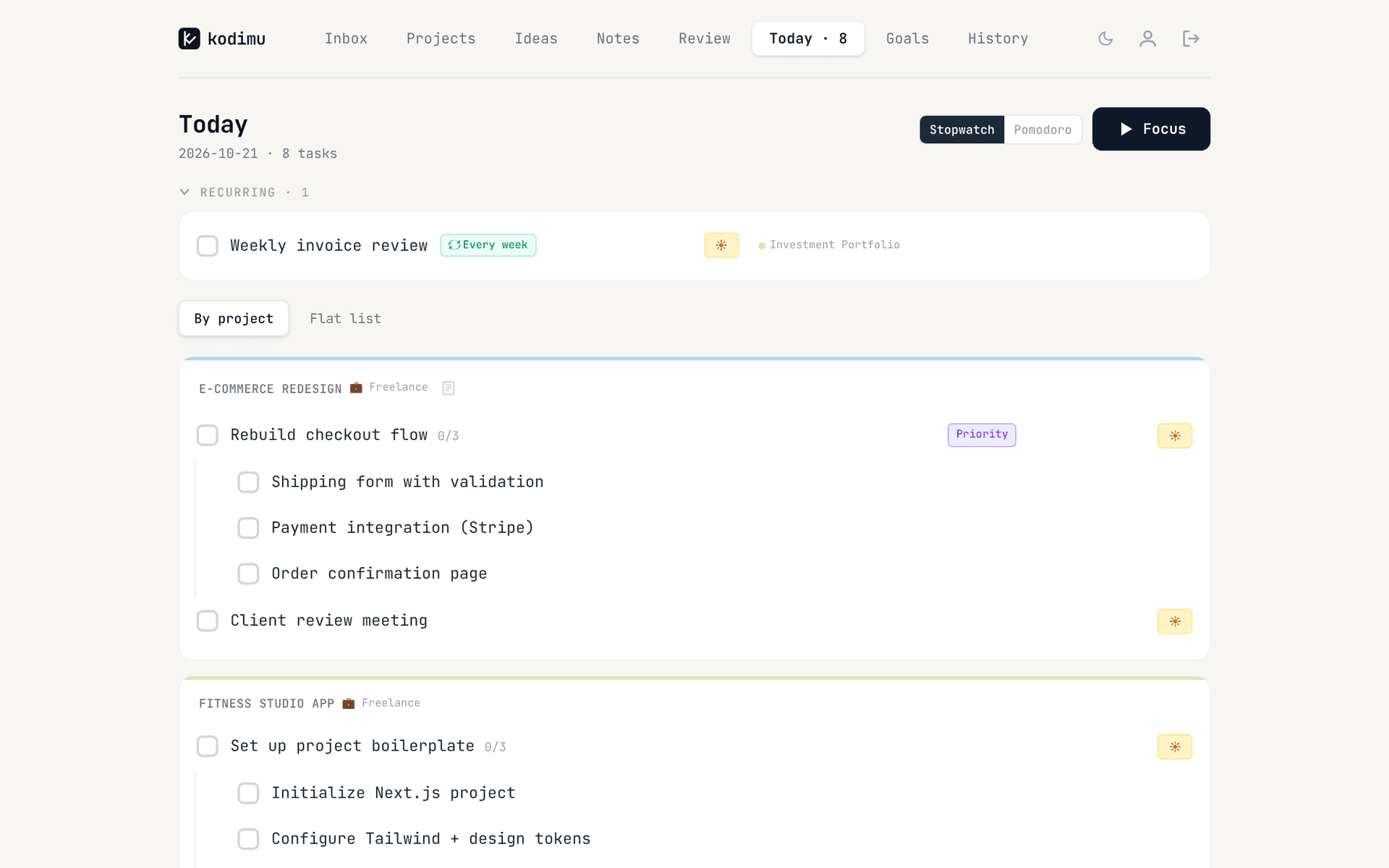
Kodimu covers the “plan today, then see what really happened” part of Sunsama. Review shows every task from every project on one screen; tick one and it moves to Today. When yesterday’s list is not finished, Kodimu asks whether to keep the leftovers on Today or move them to a Queue. Focus records real time per task with a count-up Stopwatch or an optional Pomodoro mode, pauses can carry a reason, and Today shows a daily summary of tasks done, focus time and sessions.
Task text, notes and pause comments are encrypted in the browser before upload. See the security page.
The catch
There is no calendar, no time blocking, no calendar or email integrations and no time estimates, so there is no planned-versus-actual view — only actual time. No native mobile apps, no offline mode, no reminders, no import or export. It is a beta from one developer, hosted on Vercel in the US, closed source and not audited; metadata such as dates and focus timings is not encrypted. Pricing after the beta is not set.
Lunatask
Encrypted planner with habits- Timer
- Task-bound Pomodoro timers
- Platforms
- macOS, Windows, Linux, iOS, Android
- Price
- Free plan; paid Premium
- Encryption
- End-to-end
What makes it stand out
A free plan that the company says will stay free, end-to-end encryption (“We don’t have access to the private key required to decrypt your data”) and native apps on every major desktop and mobile platform. Timers run for a specific task and sync across devices. Tasks sit next to habits, a journal and notes.
The catch
No web app, which matters if you plan in a browser tab today. Closed source, metadata not encrypted, and the timers are countdowns rather than a planned-versus-actual record. See Lunatask vs Kodimu.
Toggl Track
Time tracker with light planning- Timer
- Core product
- Platforms
- Web, Windows, macOS, iOS, Android, extensions
- Price
- Free; Starter US$9/user/mo yearly
- Encryption
- TLS; at rest not stated
What makes it stand out
If what you valued in Sunsama was the record of actual time, Toggl Track is the most mature tracker here. Its free plan includes “Simple planning: Tasks, boards, and task estimates”, so you can compare estimates with tracked time without paying. It holds ISO 27001 and SOC 2 Type II.
The catch
It is a time tracker with tasks attached, not a daily planner. Toggl’s page names Google Cloud and TLS but not encryption at rest, and since November 2025 the free plan’s API is limited to 20 requests an hour. See Toggl Track vs Kodimu.
ClickUp
Plan and track in one workspace- Timer
- Native time tracking
- Price
- Free Forever; Core US$9/user/mo yearly
- Encryption
- TLS 1.2, AES-256 at rest
What makes it stand out
ClickUp has native time tracking: a trial on the Free Forever plan, included from Core. Even the paid tier costs about half of Sunsama per year, and the same workspace can hold a team’s shared projects.
The catch
It is a project-management platform, which is a lot of interface for one person’s day. Data is encrypted at rest with AES-256 on AWS, with keys ClickUp holds; data residency is an Enterprise feature.
Not on the list: Akiflow and Morgen are often named as Sunsama alternatives, but neither is cheaper in a useful way. Akiflow has no free plan and costs US$19 a month billed yearly or US$34 monthly. Morgen’s Pro plan is US$15 a month billed yearly, also without a free tier, and its pricing page lists time blocking but not time tracking.
Which should you choose
- You want to pay nothing and keep full time tracking → Super Productivity.
- You want to keep paying for polish, but less → Amazing Marvin.
- You want a cheap app with native mobile apps and a calendar → TickTick.
- You need end-to-end encryption in native apps → Lunatask.
- Actual time matters more than planning → Toggl Track’s free plan.
- You plan with a team → ClickUp.
- You want it free, in the browser, encrypted, with real time per task and no calendar → Kodimu during the beta.
How to recreate your Sunsama workflow in Kodimu
Paste your backlog into projects with Bulk Add (one task per line; a line starting with “-” is a subtask), since there is no importer. Each morning, open Review, which shows every task from every project, and tick what you will do today; those tasks move to Today, and anything for later goes to the Queue. Work through the list in Focus with the Stopwatch, or Pomodoro if you used Sunsama’s Pomodoro view, and pause with a reason when you are interrupted. At the end of the day, Today’s summary shows tasks done, focus time and sessions — the closest thing to a shutdown — and the next morning Kodimu asks what to do with anything left over.
FAQ
- Is there a free version of Sunsama?
- No. Sunsama offers a 14-day trial, and its pricing page says it does not have a free forever plan.
- How much does Sunsama cost per year?
- On 21 October 2026 Pro was listed at US$17 a month billed yearly (US$204) or US$22 billed monthly. Its FAQ showed a different figure on the same day, so check the pricing page.
- What is the best free alternative to Sunsama?
- Super Productivity is the most complete free option, with daily planning, a schedule view and time tracking. Kodimu is free during its beta and adds end-to-end encryption, but has no calendar.
- Which Sunsama alternative tracks actual time on tasks?
- Super Productivity, Amazing Marvin, Toggl Track, ClickUp and Kodimu record time against tasks. TickTick records focus sessions, and Lunatask runs countdown timers on tasks.
- Does Kodimu have a calendar like Sunsama?
- No. Kodimu has no calendar view, time blocking or calendar integrations. It plans by list (Review, Queue and Today) and records the real time each task took.
Sources
- Sunsama — Pricing — read 2026-10-21
- Sunsama User Manual — Planned and actual times — read 2026-10-21
- Sunsama — Security / IT approval — read 2026-10-21
- Sunsama — Alternative to Todoist — read 2026-10-21
- Upbase — Best Sunsama alternatives — read 2026-10-21
- Super Productivity — Best Sunsama alternatives 2026 — read 2026-10-21
- Super Productivity — README on GitHub — read 2026-10-21
- Super Productivity — Pricing — read 2026-10-21
- TickTick blog — Brand-new Focus experience — read 2026-10-21
- ClickUp — TickTick review — read 2026-10-21
- TickTick — Upgrade / pricing — read 2026-10-21
- TickTick — Security — read 2026-10-21
- Amazing Marvin — Home — read 2026-10-21
- Amazing Marvin — Focus features — read 2026-10-21
- Amazing Marvin — Pricing — read 2026-10-21
- Amazing Marvin — Privacy — read 2026-10-21
- Lunatask — Security — read 2026-10-21
- Lunatask — Timers — read 2026-10-21
- Lunatask — Installation — read 2026-10-21
- Lunatask — Subscriptions — read 2026-10-21
- Toggl Track — Pricing — read 2026-10-21
- Toggl Track — Security and reliability — read 2026-10-21
- Mediaatelier — Toggl free plan limits — read 2026-10-21
- ClickUp — Pricing — read 2026-10-21
- ClickUp — Security — read 2026-10-21
- Akiflow — Pricing — read 2026-10-21
- Morgen — Pricing — read 2026-10-21