
This comparison covers one situation only: you, on your own, want to know how long your own tasks take. It is not about team timesheets or billing clients by the hour. For those, Toggl Track is the better tool, and this page says so plainly.
A time tracker with tasks vs a task manager with time
Toggl Track starts from the timer. You start an entry, describe it, and assign it to a project; its free plan adds “simple planning” with tasks, boards and task estimates. The basic unit is the time entry, and everything else — reports, rates, dashboards — is built on top of entries.
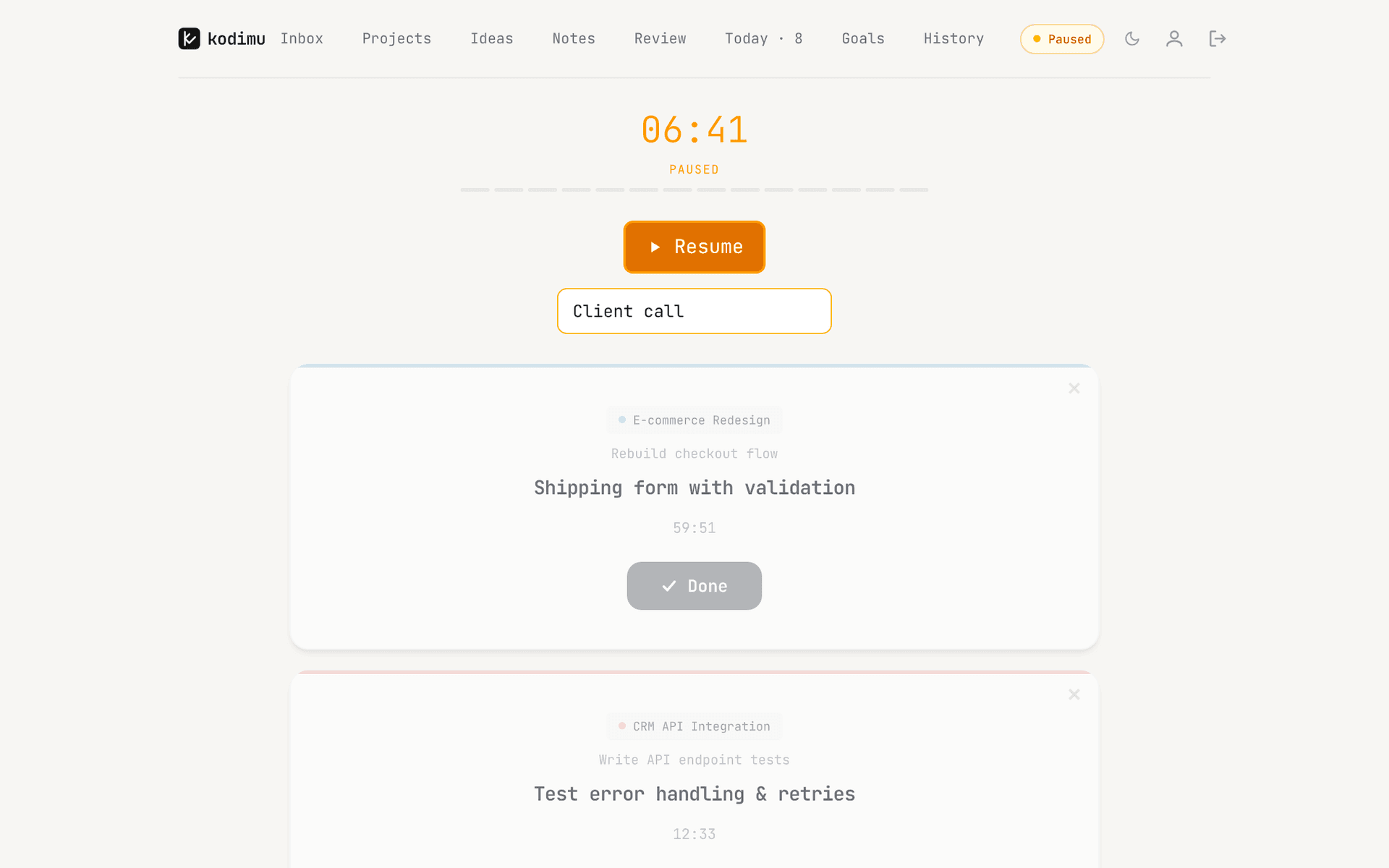
Kodimu starts from the task. Kodimu is a private, end-to-end encrypted task manager with real time tracking: you plan in projects with stages, look at every open task on the Review screen, star a few for Today, and start Focus mode. A count-up stopwatch runs on that task (an optional Pomodoro mode is there if you prefer cycles). When you finish, History records the task, how long it took and how often you paused. There is no separate description to type, because the task already is the description.
For personal use, that removes the double entry many people end up doing: a to-do app for the list, Toggl for the clock, and a moment of “what did I call this yesterday?” every time you start a timer. Two details matter more than they sound:
- Pauses with reasons. In Kodimu you pause a task rather than stopping it, and can note why — “client call”, “waiting for data”. Pause time is counted separately, so the task’s time stays honest and you can see later what interrupts you.
- Parallel timers. Several tasks can run at once, each with its own timer — useful when a build runs while you write the release notes.
Kodimu vs Toggl Track at a glance
| What matters | Toggl Track | Kodimu |
|---|---|---|
| See all tasks on one screen | Projects and tasks inside the tracker; simple boards on Free | Review: every task from every project, filtered by stage and category |
| Real elapsed time per task | The core product: timers, manual entries, apps and extensions | Count-up timer per task, parallel timers, optional Pomodoro mode |
| Pauses with reasons | You stop and restart entries; each entry has its own description | Pause with an optional comment; pause time counted separately |
| Time history | Detailed reports and exports | History by day and month; no reports export |
| Who holds the encryption key | Toggl — TLS in transit; at-rest encryption not specified; not end-to-end | You, for task text and pause comments; timestamps and durations are not encrypted |
| Where data is processed | Google Cloud Platform; region not stated on Toggl’s security page | Vercel, United States; task content arrives already encrypted |
| Platforms | Web, Windows, macOS, iPhone, iPad, Android, Chrome and Firefox extensions | Web app (installable); no native apps, no extensions, no offline mode |
| Price | Free plan for small teams (user limit differs between sources); Starter $9 per user/month yearly, $12 monthly | Free during beta; pricing may change |
Where Toggl Track still shines
In most of the places a time tracker is judged, Toggl is ahead. Specifically:
- Reports and exports. Toggl is built to turn time into reports you can filter, share and export. Kodimu’s History and Monthly tab are for looking at your own patterns; there is no export of any kind, not even CSV.
- Billing. Billable rates, clients and profitability views exist on Toggl’s paid plans. Kodimu has no rates, no clients and no invoices.
- Teams. Even the free plan is built for several users in one workspace. Kodimu has no collaboration at all.
- Apps and integrations. Native desktop and mobile apps plus browser extensions that put a Toggl timer inside other tools — Todoist lists one that starts and stops a timer from inside Todoist in Chrome, Firefox or Edge. There is also an API, though a third-party review reports that the free plan has been limited to 20 API requests per hour since November 2025. Kodimu has no integrations, no browser extension and no public API.
- Certifications. Toggl’s security page lists ISO 27001:2022 and a SOC 2 Type II report. Kodimu has no certification and no independent audit.
- Track record. A long-running company versus a beta built by one developer.
One more point in Kodimu’s favour for personal use: it is a task manager in its own right — projects with stages, Inbox, recurring tasks, a Queue for what comes next and up to four goals on the Review screen — so you do not need a second app for the list. If you mostly want to compare planned and actual time, our guide on estimated vs actual time covers that question; note that Kodimu records actual time only and has no estimates field.
What Toggl’s security page actually says
“Hosted on Google Cloud Platform … with TLS encryption”
The page lists ISO 27001:2022 and SOC 2 Type II (an earlier version said Type 1). It does not specify encryption at rest, does not name a hosting region, and does not mention end-to-end encryption. That is normal for a time tracker: reports, team dashboards and integrations all need the server to read your entries.
Kodimu’s model is different, and narrower than it may sound. Your browser encrypts what you write — task text, project names, notes and pause comments — with a key derived from an encryption password only you know. The timings themselves are not encrypted: the server can see when a focus session started, how long it lasted and how long you paused, just not what the task was or why you paused. The details, including the full list of unencrypted fields, are on the security page.
Moving from Toggl Track to Kodimu
You are not moving time entries — Kodimu has no import, and its History begins when you start timing in it. What you move is the work ahead of you.
- 1
Keep a copy of your Toggl history
Export the reports you may need later from Toggl before you change anything. Kodimu cannot import them, and it cannot export its own history either.
- 2
Create your account and encryption password
Sign up, then set an encryption password that differs from your login password. Download the Recovery Key from Settings and keep it safe; there is no in-app restore screen for it yet.
- 3
Turn Toggl projects into Kodimu projects
Create a project for each one you still work on, and use categories (each with an emoji) where Toggl had clients or groups.
- 4
Write the upcoming tasks and paste them into Bulk Add
One task per line; sub-steps go below, each starting with a dash and a space:
Write chapter 3 draft
- Outline sections
- Collect sources
Fix newsletter template
Star what you will do today, open Focus and start the first timer.
What won’t transfer automatically
- Past time entries and reports — keep them in Toggl or in your exports.
- Clients, billable rates and tags — Kodimu has none of these.
- Team members and shared workspaces.
- Integrations and the in-page browser timer.
- Toggl’s desktop features and any reminders you rely on — Kodimu sends no notifications.
FAQ
- Is there a free Toggl alternative for personal use?
- Several. Clockify has a free plan; Super Productivity — which AlternativeTo lists as the top Toggl alternative — is free, open source and local-first with time tracking; Kodimu is free during beta and combines tasks with a timer. See Kodimu vs Clockify and our list of task managers with built-in time tracking.
- Is Toggl Track end-to-end encrypted?
- Its security page describes hosting on Google Cloud Platform with TLS encryption and lists ISO 27001 and SOC 2 Type II. It does not mention end-to-end encryption, and certifications are not the same thing.
- Can Kodimu replace Toggl for freelancers?
- Only if you never need to export hours or bill by time. Kodimu has no export, no rates and no invoices. Many freelancers keep Toggl for client time and use a task manager for everything else.
- Can I import my Toggl time entries into Kodimu?
- No. Kodimu has no import. Keep your Toggl exports for the record and start fresh in Kodimu.
- Does Kodimu have a desktop app or browser extension like Toggl?
- No. Kodimu is a web app you can install from the browser. It has no desktop app, no extension and no integrations.
Sources
- Toggl — Security and reliability — read 2026-10-21
- Toggl Track — Pricing — read 2026-10-21
- Todoist integrations — Toggl Track — read 2026-10-21
- Mediaatelier — Toggl free-plan limits — read 2026-10-21
- fastlancer — Clockify vs Toggl — read 2026-10-21
- AlternativeTo — Toggl Track alternatives — read 2026-10-21