
Clockify’s free plan is one of the most generous in time tracking, which is why “Clockify alternative” searches are rarely about price. They usually come from people who use Clockify as a stopwatch next to a separate to-do list and wonder whether one app could do both. This page compares the two for that personal scenario only — not team timesheets.
Kodimu vs Clockify at a glance
| What matters | Clockify | Kodimu |
|---|---|---|
| See all tasks on one screen | Projects and tasks to log time against; not a to-do list | Review: every task from every project, filtered by stage and category |
| Real elapsed time per task | Timer and manual entries; Pomodoro timer on Free | Count-up timer per task, parallel timers, optional Pomodoro mode |
| Pauses with reasons | Separate time entries; no pause reasons in the pages we checked | Pause with an optional comment; pause time counted separately |
| Time history | Reports; some report and export options only on paid plans | History by day and month; no export |
| Who holds the encryption key | CAKE.com — no encryption details published; not end-to-end | You, for task text and pause comments; timestamps and durations are not encrypted |
| Where data is processed | A default “global region”; USA, EU (Germany), UK or Australia on Pro and Enterprise | Vercel, United States; task content arrives already encrypted |
| Platforms | Web, Windows, macOS, Linux, iOS, Android, Chrome, Firefox and Edge extensions | Web app (installable); no native apps, no extensions, no offline mode |
| Price | Free plan; paid from $3.99 per seat/month billed yearly ($4.99 monthly) | Free during beta; pricing may change |
About that user limit: Clockify’s pricing table, its FAQ and its “free Toggl alternative” page describe it differently, and several 2026 reviews report a new cap. For one person tracking their own work, it makes no difference. For a team, read the current pricing page before you plan around it.
Clockify times work; Kodimu times tasks
Clockify is a time tracker. It has projects and tasks, but they exist so you can log time against them — it is not built to be the place where you plan your week. Most people who use it personally keep their actual to-do list somewhere else.
Kodimu is a private, end-to-end encrypted task manager with real time tracking. The planning side is a full task manager — projects with stages, an Inbox, recurring tasks, a Queue for what comes next, up to four goals and one Review screen with every task from every project. The timing side lives on the task: open Focus mode and a count-up stopwatch runs on the task in front of you.
Both apps offer a Pomodoro timer, so that is not the difference. These are:
- Pause, don’t stop. In Kodimu you pause a task and can type why. Pause time is stored separately from focus time, so the task keeps one honest total and you can later see what interrupted you.
- Parallel tasks. Several tasks can run at the same time, each with its own timer.
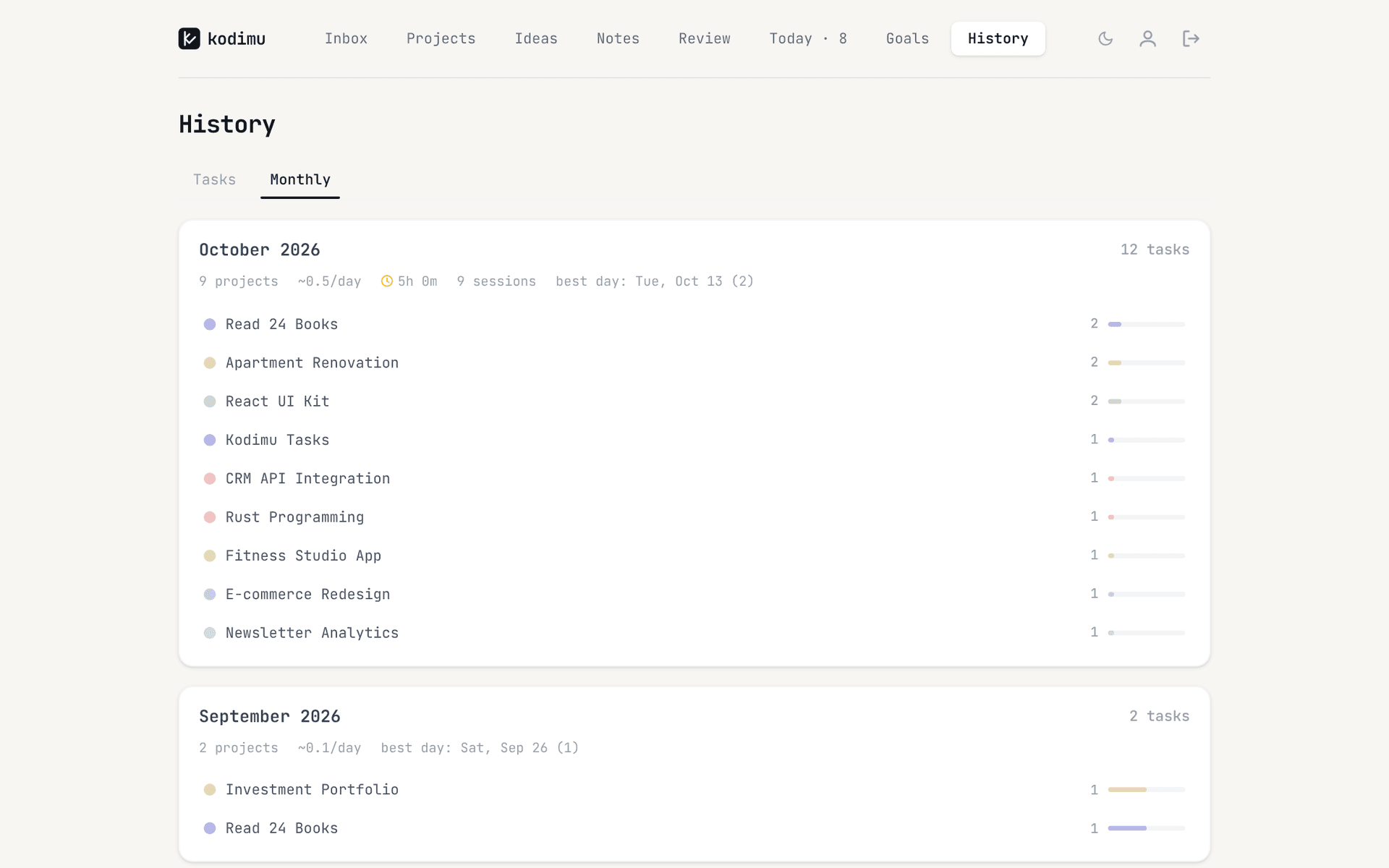
- History tied to the task. Completed tasks are logged by day with their time, and the Monthly tab shows focus time, sessions, tasks per project and your busiest day.
One working morning in each app
With Clockify as your timer, a morning usually looks like this: you check your to-do app for what is next, switch to Clockify, start the timer, type a description and pick a project. When a call interrupts you, you stop the entry and later start a new one. At the end of the week, a report groups the entries by project — useful, but the entries and the tasks live in two different apps that never talk to each other.
In Kodimu, the same morning starts on the Review or Today screen. You open Focus on the first starred task and the timer starts on it; there is nothing to type. When the call comes, you press Pause and note “call with landlord”. Afterwards you resume, mark the task done and move on to the next card. The Today page then shows how many tasks you finished, your total focus time and the number of sessions, and the time stays attached to each task in History.
Where Clockify still shines
- A real free plan. Free time tracking, including a Pomodoro timer, with no trial clock. Kodimu is free only during its beta, and its future pricing is not decided.
- Apps for every system. Native apps for Windows, macOS, Linux, iOS and Android plus extensions for three browsers. Kodimu is a web app only, with no offline mode.
- Reports, timesheets and billing. Clockify is built to turn hours into reports and, on paid plans, invoices. Kodimu has no export at all, no rates and no clients.
- Teams. Workspaces built for several users. Kodimu has no collaboration.
- Data regions. On Pro and Enterprise you can choose USA, EU (Germany), UK or Australia. Kodimu is hosted in the United States only.
- Certifications. CAKE.com lists SOC 2 Type II and ISO/IEC 27001:2022. Kodimu has no certification and no independent audit.
What Clockify’s security page actually says
Clockify’s security information lives on the page of its parent company, CAKE.com, based in Palo Alto, California. It lists SOC 2 Type II (report on request), ISO/IEC 27001:2022 and GDPR, but describes no encryption method and does not mention end-to-end encryption. There is little more to quote: Clockify’s help centre adds that workspaces live in a default “global region” unless a Pro or Enterprise workspace picks the USA, the EU (Germany), the UK or Australia.
Certifications show that a company runs audited processes. They do not change who can read the data: a time tracker with reports and team dashboards has to read your entries on the server. That is a design choice, not a failing.
Kodimu encrypts what you write — task text, project names, notes, pause comments — in your browser with a key derived from an encryption password only you know. The timings are not encrypted: the server sees when sessions start and how long they last, not what they were for. Kodimu is closed source and unaudited; the full design is on the security page.
Moving from Clockify to Kodimu
Kodimu has no import, and its History starts when you start timing in it. You move the work ahead of you, not your past entries.
- 1
Keep your Clockify records
Export or save any reports you may need later. Kodimu cannot import them and cannot export its own history.
- 2
Create your account and encryption password
Sign up and set an encryption password that differs from your login password. Download the Recovery Key in Settings and store it safely; there is no in-app restore screen for it yet.
- 3
Recreate the projects you still work on
One Kodimu project per active Clockify project. Use categories (each with an emoji) to group them the way you grouped clients.
- 4
Paste your open tasks into Bulk Add
One task per line; sub-steps on the lines below, each starting with a dash and a space:
Prepare quarterly tax documents
- Download bank statements
- Sort receipts
Update CV
Star today’s tasks, open Focus and start the first timer.
What won’t transfer automatically
- Time entries, reports and timesheets.
- Clients, rates, invoices and tags.
- Team members and workspace settings.
- Browser-extension timers inside other tools.
- Anything that relied on notifications — Kodimu sends none.
FAQ
- Is Clockify really free for personal use?
- Yes, there is a free plan that covers individual time tracking, including a Pomodoro timer. Clockify’s pages describe the free user limit inconsistently, which only matters if you add other people.
- Is Clockify end-to-end encrypted?
- Its parent company’s security page lists SOC 2 Type II and ISO 27001 but does not describe encryption methods or mention end-to-end encryption. Certifications are not the same thing as end-to-end encryption.
- Where does Clockify store my data?
- By default in what Clockify calls a “global region”. Pro and Enterprise workspaces can choose the USA, the EU (Germany), the UK or Australia.
- Does Kodimu have a Pomodoro timer like Clockify?
- Yes, as an option. Focus mode defaults to a count-up stopwatch, and you can switch to Pomodoro (25/5 minutes by default, adjustable). Both modes record real time per task. See the Focus mode guide.
- Can I export my time from Kodimu?
- No. Kodimu has no export of tasks or time. If you need exported hours, that alone is a reason to stay with Clockify.
Sources
- Clockify — Pricing — read 2026-10-21
- Clockify Help — Data regions — read 2026-10-21
- CAKE.com — Security — read 2026-10-21
- Clockify — Free Toggl alternative (free-plan wording) — read 2026-10-21
- fastlancer — Clockify vs Toggl — read 2026-10-21
- We Are Founders — Best time tracking apps for freelancers in 2026 — read 2026-10-21