
Most to-do apps let you write down how long a task should take. Very few tell you how long it actually took. Without that second number, your estimates never get better — they just get repeated.
Why your estimates miss
Daniel Kahneman and Amos Tversky described the planning fallacy in 1979: we predict that our own future tasks will take less time than they do, even when we know similar tasks ran late before. Wikipedia’s summary adds an important detail — the bias mainly affects predictions about your own work. Outside observers tend to err the other way.
The best-known example is a 1994 study by Buehler, Griffin and Ross. Thirty-seven psychology students estimated how long their theses would take. The average estimate was about 34 days; the average actual time was about 56 days, and only around 30% finished by the date they had predicted.
The usual explanation is the “inside view”. When you estimate, you picture the task going well, step by step. You do not picture the email that interrupts you, the file you cannot find, or the twenty minutes you need to get back into it. The remedy is the “outside view”: look at how long tasks like this one took in the past. That needs data, and most people have none.
People keep asking their task apps for this
The gap shows up again and again in public feature-request boards. Users are not asking for more estimates; they are asking to see the actual number next to the one they guessed:
- Sunsama’s roadmap: “track actual time separately from estimated time”, with a prompt on completion asking whether the task really took the planned time, so you can see where you under- or over-estimate.
- Everdo forum: a stopwatch per task plus analytics on how often you under- or over-estimate.
- Remember The Milk forum: a start button on each task that stops on completion, to compare with the estimate.
- WeekPlan support: a “smart way to track time spent on a task, without task being completed”.
- A Featurebase board: an “actual time spent” field, because people finish tasks over several sittings.
That last point matters. Real tasks are rarely done in one go. A useful record has to survive pauses and multiple sessions, otherwise it reports the last sitting, not the task.
A two-week method that works with any timer
You do not need special software for this — a stopwatch and a notebook will do. What you need is consistency for about ten working days.
- 1
Write your guess before you start
Put it in the task itself, for example “Draft client proposal ~45m”. Writing it first stops you from adjusting the guess after the fact.
- 2
Time the work, not the calendar
Start a timer when you actually begin and pause it when you stop — for a call, lunch or a detour. If the task spans two days, keep adding to the same task rather than starting over.
- 3
Note why you paused
Two or three words are enough: “Slack”, “waiting for files”, “phone”. This is the most useful data you will collect.
- 4
Do not change how you work yet
The point of the first two weeks is an honest baseline. Optimising while measuring hides the pattern.
- 5
Group by task type and compute the ratio
At the end, sort tasks into a handful of types (writing, admin, code, calls) and divide total actual time by total estimated time for each type. That ratio is your personal correction factor.
| Task type | Estimated (total) | Actual (total) | Ratio | What to do next time |
|---|---|---|---|---|
| Writing | 6 h | 9 h 30 m | 1.6× | Multiply writing guesses by 1.5 |
| Admin / email | 3 h | 3 h 20 m | 1.1× | Guesses are fine |
| Small fixes | 2 h | 5 h | 2.5× | Stop calling them “small” |
| Calls | 4 h | 4 h 15 m | 1.1× | Add buffer for follow-up notes |
Two patterns tend to appear. Familiar, well-bounded tasks are estimated reasonably well. Vague ones (“quick fix”, “look into X”) are where the big misses live. The ratio tells you where to pad, and where to split a task into smaller pieces before you estimate it.
Use pause reasons to see your interruptions
Total time answers “how long”. Pause reasons answer “why so long”. If “Slack” shows up in a third of your pauses, the problem is not your estimate — it is your working conditions, and the fix is a notification setting rather than a bigger number.
Keep pause time separate from focus time. A task that took 90 minutes of work spread across three hours tells a different story from one that took three hours of solid work. Both are useful; mixing them is not.
Which tools help
Three kinds of tools can do the recording for you:
- Task managers with an estimate and an actual field. Sunsama documents “planned” and “actual” times on each task, with a task timer. Super Productivity shows time spent next to the estimate and keeps a worklog. Amazing Marvin tracks time per task and uses estimates for its focus progress bar. Our list of task managers with built-in time tracking compares them.
- Dedicated time trackers. Clockify and Everhour offer estimate-vs-tracked reports, aimed mostly at teams and client work, and connect to task apps through integrations.
- Kodimu, our app, records actual time only. Its Focus mode runs a count-up stopwatch by default (an optional Pomodoro mode exists), lets you pause with a reason, and keeps pause time separate. Several tasks can run at once, each with its own timer. History shows completed tasks with the time spent on each, plus monthly totals.
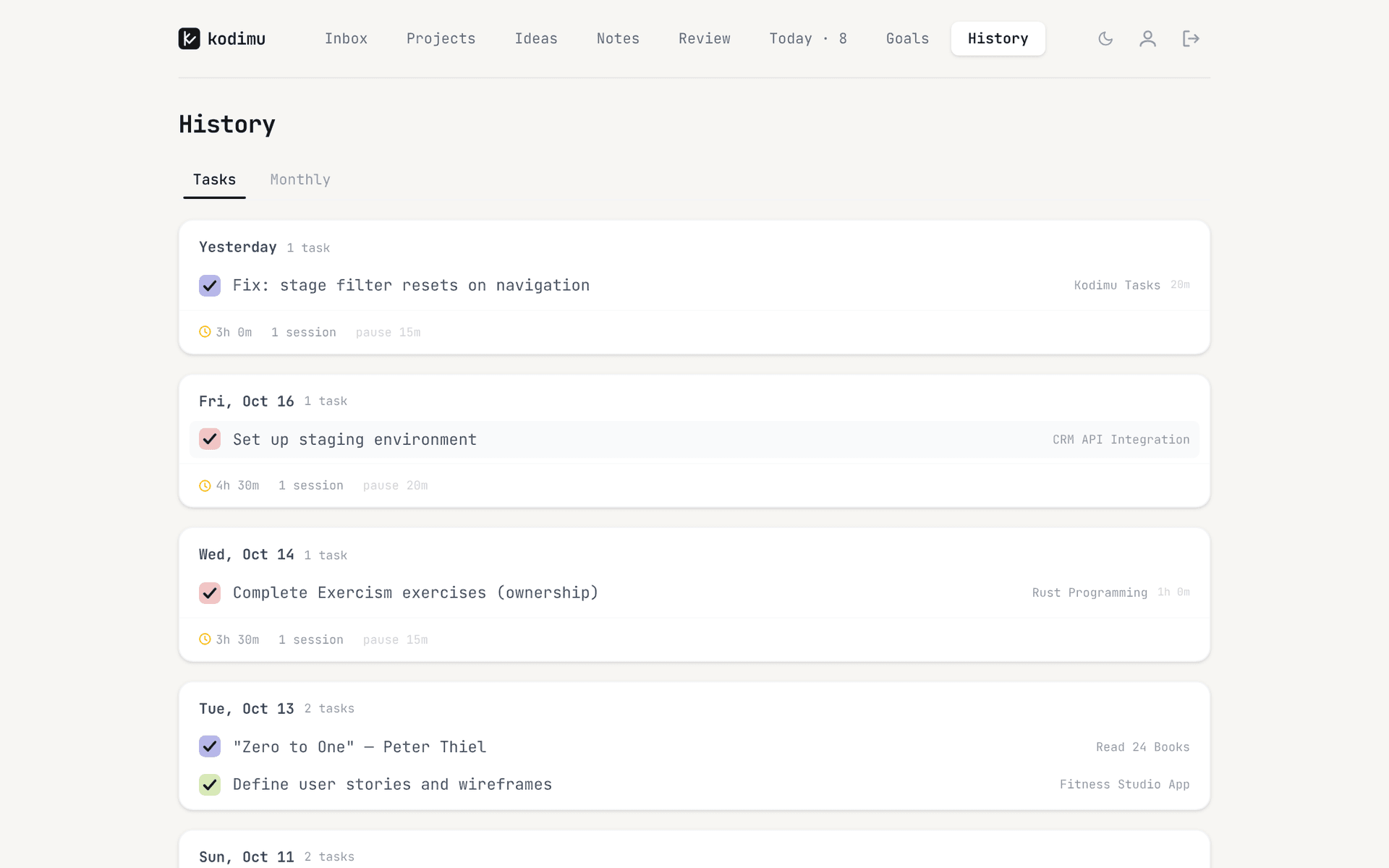
One thing Kodimu adds: task text and pause reasons are encrypted in your browser before upload, so the record of what you worked on and why you stopped is not readable on the server. Timings themselves (start, end, seconds) are not encrypted. Details are on the security page.
FAQ
- How do I track how long my tasks actually take?
- Start a timer when you begin a task, pause it whenever you stop, and keep adding to the same task across sessions. Do it for about two weeks before drawing conclusions.
- Why do my tasks always take longer than I estimate?
- That is the planning fallacy: when estimating our own work we imagine the ideal path and leave out interruptions and setbacks. Comparing against your own past actual times corrects for it better than trying harder to guess.
- What is a good estimate vs actual ratio?
- There is no universal number. What matters is your ratio per task type; if writing reliably takes 1.5× your guess, multiply future writing guesses by 1.5.
- Which apps show estimated vs actual time?
- Sunsama (planned and actual times), Super Productivity (time spent vs estimate) and Amazing Marvin record both; Clockify and Everhour report estimates vs tracked time for projects. Kodimu records actual time only, without an estimate field.
- Should I count breaks in the actual time?
- Track them, but separately. Focus time tells you how much work the task needed; pause time and pause reasons tell you what got in the way.
Sources
- Wikipedia — Planning fallacy (Kahneman & Tversky 1979; Buehler, Griffin & Ross 1994) — read 2026-10-21
- Sunsama roadmap — Track actual time separately from estimated time — read 2026-10-21
- Everdo forum — Task time comparison to estimate — read 2026-10-21
- Remember The Milk forum — idea 28253 — read 2026-10-21
- WeekPlan support — Smart way to track time spent on a task — read 2026-10-21
- Featurebase — Tracking actual time spent on tasks — read 2026-10-21
- Sunsama User Manual — Planned and actual times — read 2026-10-21
- Super Productivity — Time tracker — read 2026-10-21
- Amazing Marvin — Focus features — read 2026-10-21
- Clockify — Task tracker app — read 2026-10-21
- Everhour — Asana estimate vs actual — read 2026-10-21