
Unlike Todoist, TickTick does not need a plugin to time your tasks. It has a built-in Focus timer with a stopwatch, a Pomodoro mode and statistics. The real question is whether the numbers it records are the ones you need.
What TickTick Focus does
TickTick renamed its Pomo timer to Focus in 2020 and added a stopwatch alongside the countdown. The announcement explains why:
Stopwatch was added “to enable you to easily track the time spent on the task that you were not sure for how long it would take”, and Focus Statistics show “how much time and effort you’ve devoted into different tasks”.
In practice that gives you:
- Two timer styles. Pomodoro (countdown with breaks) or Stopwatch (counts up until you stop).
- Sessions linked to tasks. You start Focus from a task, and the time is attributed to it.
- Statistics. A 2026 review by ClickUp (a competitor, so read with that in mind) describes daily, weekly and monthly focus totals and Pomodoro sessions tracked per task, on both free and Premium plans.
For many people that is enough: you see roughly how long a task took and where your focused hours went this week. If that matches your goal, you don’t need anything else.
What the Focus stopwatch doesn’t tell you
These gaps are based on TickTick’s announcement and the reviews we read on 21 October 2026. If TickTick has added any of them since, we would like to know.
Why you stopped
A focus session records time, not context. We found no way described to attach a reason to a pause (“client call”, “waiting for review”, “lost focus”). Over a month, those reasons are often more useful than the totals: they show what keeps interrupting your work.
Pause time as its own number
Focus time and break time are different things. The statistics described in the sources above report focus time; we found no separate daily figure for time spent paused. If interruptions are what you are trying to reduce, that is the number you want.
More than one task at a time
You start Focus from a single task, and we found no description of two task timers running at once. If you keep two things going in parallel — a long upload and a draft, a build and a code review — you have to choose which one gets the time.
Who can read the history
TickTick says task data is encrypted at rest and hosted on AWS in the United States; it does not offer end-to-end encryption. Your focus history sits alongside your tasks, readable by the service. See Is TickTick safe? for the full picture.
Three ways to track time on TickTick tasks
1. TickTick’s built-in Focus
The default and the simplest. No extra account, no extension. Best if you want a Pomodoro rhythm and weekly totals.
2. A time-tracker integration such as TimeCamp
TimeCamp adds a timer button to TickTick tasks through a browser extension and says one time-tracking integration is included on its free plan. This is the route if you need timesheets, billable hours or reports for a client — things a personal focus timer is not built for. The cost is a second app, a second account, and your task names stored in two places.
3. A task manager with a per-task timer built in
If what you want is “how long did this task really take, and what interrupted me”, a task manager that records that natively can replace both. Kodimu (our app) is one option: its Focus mode counts real time per task with a stopwatch by default, with an optional Pomodoro mode. You can pause with an optional reason, pause time is counted separately, and several tasks can each run their own timer in parallel. The History screen lists completed tasks by day with the time each took, plus monthly stats per project.
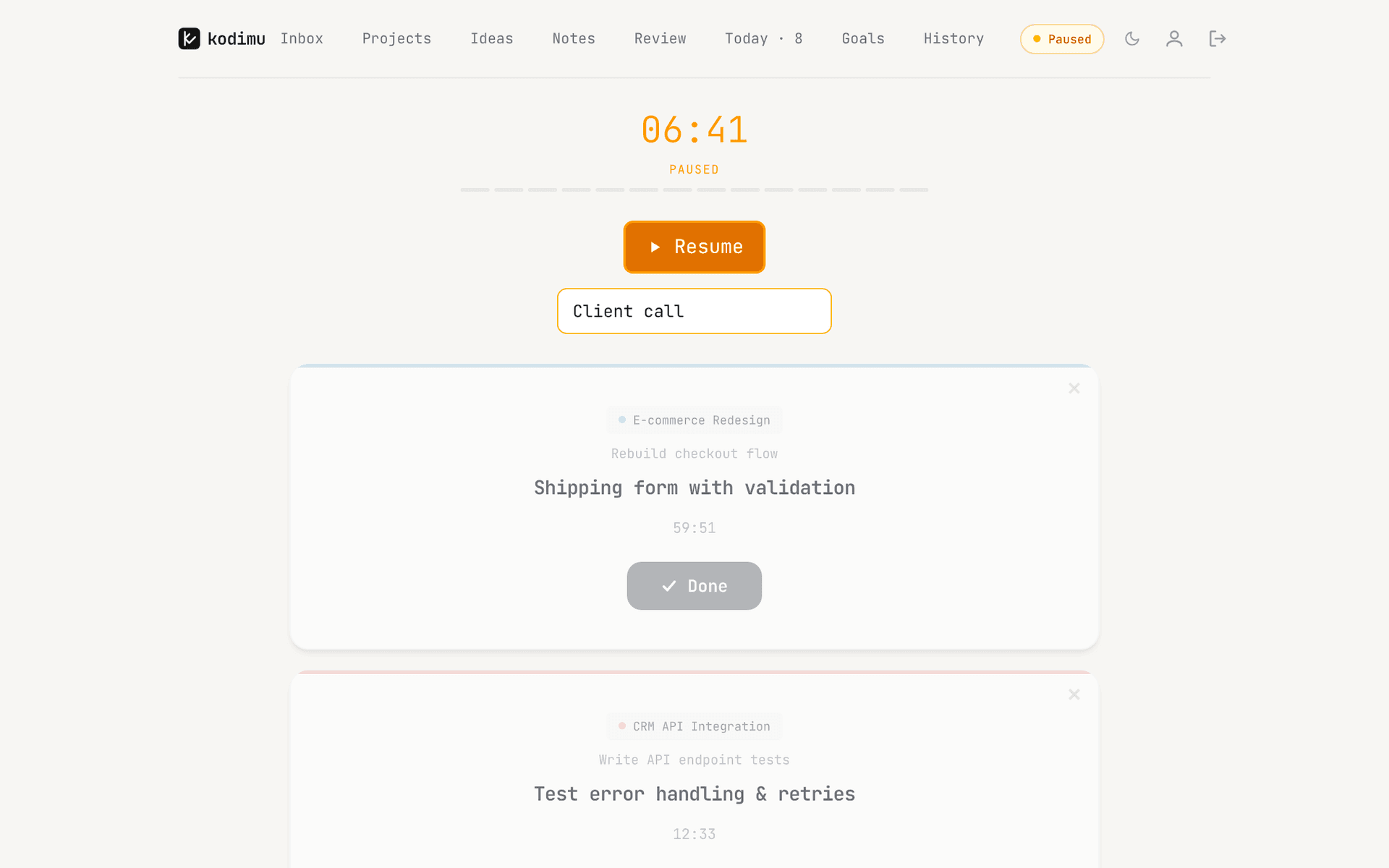
The honest catch: Kodimu is a web app only, with no mobile apps, no calendar, no reminders, no import from TickTick and no export of your time data yet. It is in beta and free during beta; pricing may change.
Side by side
| Method | What you get | What you don’t get |
|---|---|---|
| TickTick Focus | Stopwatch or Pomodoro on a task; statistics by task, day, week and month; no extra app | Pause reasons, parallel timers, end-to-end encryption |
| TimeCamp extension | Timer on TickTick tasks in the browser; timesheets and reports | Pause reasons; tasks and time in one app; end-to-end encryption |
| Kodimu | Real time per task, pause reasons, parallel timers, History per day and month; task text encrypted in the browser | Mobile apps, calendar, reminders, import/export, integrations |
Which to choose
- Stay with TickTick Focus if you like Pomodoro, use TickTick on your phone, and weekly totals answer your question.
- Add TimeCamp if you bill clients or need exportable timesheets.
- Try a task manager with a per-task timer if you want to know why tasks take longer than planned, run tasks in parallel, or keep your task text unreadable to the provider. Our Kodimu vs TickTick page goes into detail, and the security page explains the encryption.
FAQ
- Does TickTick have time tracking?
- Yes. TickTick’s Focus feature has a stopwatch and a Pomodoro timer linked to tasks, and Focus Statistics show how much time went into different tasks.
- Do I need a plugin to track time in TickTick?
- Not for personal tracking — Focus is built in. Integrations such as TimeCamp make sense when you need timesheets, billable hours or client reports.
- Can TickTick track time on two tasks at once?
- We found no documentation of parallel timers in TickTick; a Focus session is started from one task. Kodimu lets several tasks run in parallel, each with its own timer.
- Is TickTick Focus available on the free plan?
- According to a 2026 ClickUp review, Focus and its statistics are available on both free and Premium plans. Check TickTick’s current plan page, as features move between tiers.
- Is my TickTick focus history encrypted?
- It is stored with your tasks, which TickTick says are encrypted at rest on AWS servers in the US. It is not end-to-end encrypted, so the service can read it.
Sources
- TickTick blog — Unlock a brand-new Focus experience (6 May 2020) — read 2026-10-21
- ClickUp — TickTick for task management: full review (2026) — read 2026-10-21
- TimeCamp — TickTick time tracking integration — read 2026-10-21
- TickTick — Security — read 2026-10-21