
Things 3 is one of the most admired to-do apps ever made, and most people who search for a Things 3 alternative do not dislike it. They got a Windows laptop for work, an Android phone, or a Linux machine, and Things cannot follow them there. A smaller group wants something Things never set out to do: measure how long tasks take.
Kodimu is a private, end-to-end encrypted task manager with real time tracking. It runs in the browser, shows every task from every project on one Review screen, and counts the real time you spend on each task. Things 3 is a native app by Cultured Code, a company in Stuttgart, Germany, with optional sync through Things Cloud.
Kodimu vs Things 3 at a glance
| What matters | Things 3 | Kodimu |
|---|---|---|
| See all tasks on one screen | Today, Upcoming and Anytime collect to-dos across projects and areas | Review: every task from every project, filtered by stage and category |
| Real elapsed time per task | No built-in timer | Count-up timer per task, with an optional Pomodoro mode |
| Pauses with reasons | No timer, so no pauses | Pause with an optional comment; pause time counted separately |
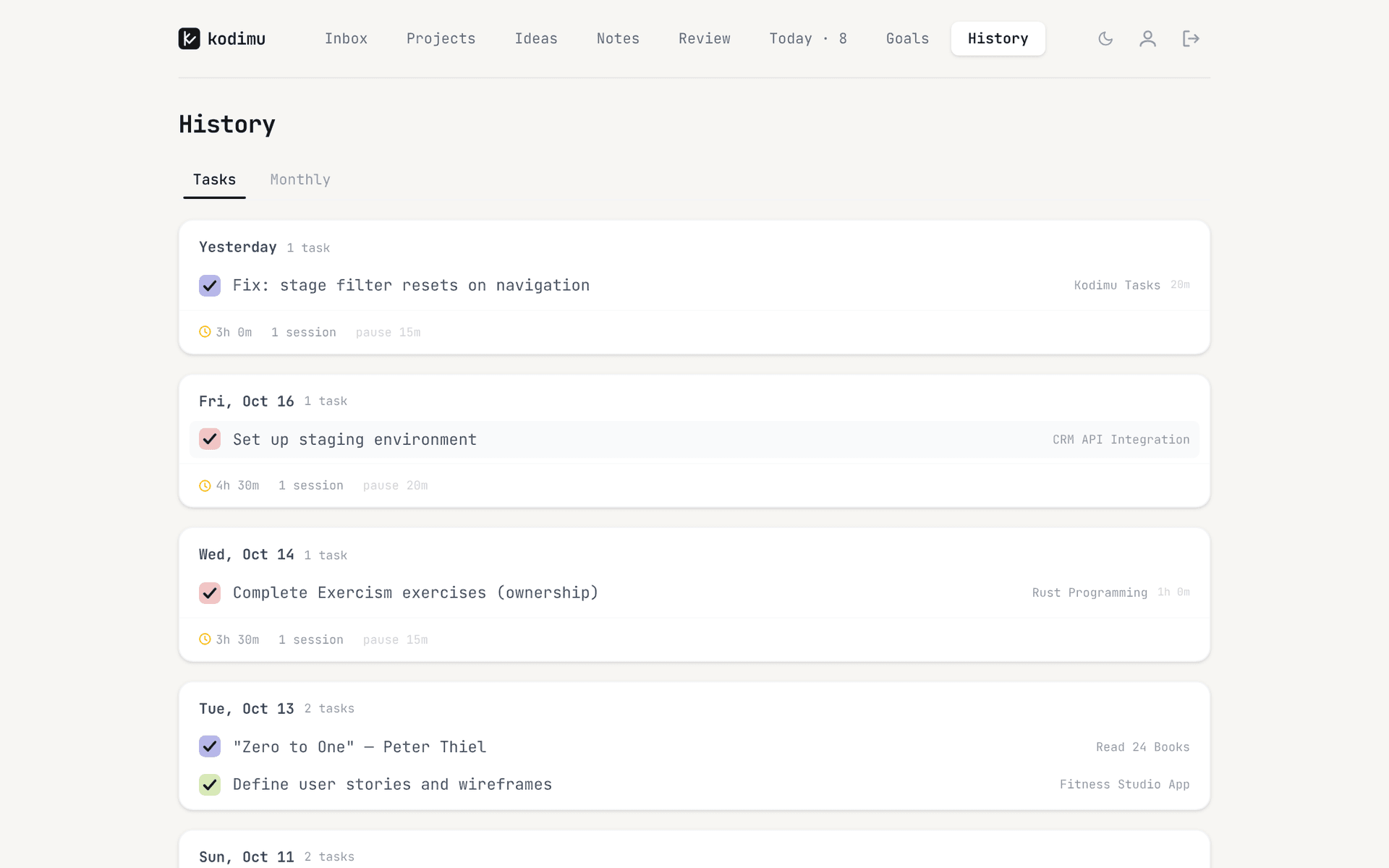
| Time history | No time data | History by day and month: time per task, sessions, pauses |
| Who holds the encryption key | Cultured Code — 256-bit AES at rest, not end-to-end | You — derived in the browser from your encryption password |
| Where data is processed | On your devices; with sync, in Things Cloud run by Cultured Code GmbH & Co. KG (Germany) | Vercel, United States; task content arrives already encrypted, metadata such as dates does not |
| Platforms | Mac, iPhone, Apple Watch, iPad, Apple Vision Pro | Any modern browser on Windows, Linux, macOS, Android or iOS; no native apps, no offline mode |
| Price | One-time purchase per platform — around $50 Mac, $10 iPhone, $20 iPad (third-party figures) | Free during beta; pricing may change |
The real difference: Apple-only vs any browser
Things’ pricing page lists Mac, iPhone and Apple Watch, iPad and Apple Vision Pro. There is no Windows version, no Android app and no web app. If even one device in your day is not made by Apple — the work PC, the family Chromebook, the Android phone — Things has a hole in it.
Kodimu goes the other way. It is a web app, so the same account works in Chrome on a Windows work laptop, Firefox on Linux and the browser on an Android phone, and you can install it to the home screen. The trade-off is real: it is not a native app, it needs a connection, and it will never feel as polished on a Mac as Things does.
The second difference is time. Things tells you what to do today; it does not record how long anything took. In Kodimu you start a task in Focus mode and a count-up stopwatch runs (an optional Pomodoro mode exists if you prefer cycles). You can pause and note why, run several tasks in parallel with separate timers, and later open History to see how long each task really took — by day, or by month with time per project.
Where Things 3 still shines
- Design. Things is widely held up as the benchmark for how a to-do app should look and feel. Kodimu is a functional beta built by one developer; it is clean, but it is not in that league.
- Pay once. Things is a one-time purchase per platform, which is why it appears on almost every list of to-do apps without a subscription. Kodimu is free during beta, and its future pricing is not decided.
- Native on every Apple device. Including Apple Watch and Vision Pro, with the speed and offline use of native apps. Kodimu has no native apps and no offline mode.
- A thoughtful planning model. Things separates Today, Upcoming (to-dos with future start dates), Anytime and Someday, and groups projects into areas of responsibility. Kodimu has stages, a Queue and optional due dates, but no start dates, no calendar view and no reminders.
- Sync is opt-in. A Privacy Guides commenter notes that sync stays off until you create a Cultured Code account. If you use Things on a single Mac without sync, your to-dos never leave that Mac — more private than any cloud app, Kodimu included.
- A European company. Cultured Code GmbH & Co. KG is based in Stuttgart, and its privacy policy cites German data protection law. Kodimu is hosted in the United States.
What Cultured Code’s pages actually say
The Things support FAQ describes encryption at rest like this:
“… industry-standard 256-bit AES encryption …”
The same FAQ says data in transit is protected with a 2048-bit certificate. The privacy policy adds the transport side and what Things Cloud stores:
“TLS for all information that is being transmitted” … and, for Things Cloud, “the content you provided”.
Neither page mentions end-to-end encryption. With sync on, your to-dos are stored on Cultured Code’s servers in a form the company can decrypt — the usual model, and protected well, but the key is not yours. A Privacy Guides thread sums Things up as “not open-source or end-to-end encrypted”. Our explainer Is Things 3 encrypted? goes through the wording in more detail.
In Kodimu, an encryption password you choose — separate from your login — is turned into a key in your browser (PBKDF2-SHA-256, 600,000 iterations), which unlocks a random AES-256-GCM key that encrypts task text, project names and notes before upload. Metadata such as due dates, priorities and timer timings is not encrypted, the client is not open source, and there has been no independent audit. All of it is documented on the security page.
Moving from Things 3 to Kodimu
Kodimu has no import. You move your active work by copy and paste into Bulk Add, which creates one task per line. Moving only what is still open is usually the best moment to clean up anyway.
- 1
Create your account and encryption password
Sign up, then set an encryption password that differs from your login password. Download the Recovery Key from Settings and store it safely — Kodimu cannot recover the password, and there is no in-app restore screen for the key yet.
- 2
Map areas to categories and projects to projects
Create a category for each Things area (each gets an emoji) and a project for each active Things project. Loose to-dos from Anytime can go to the Inbox.
- 3
Copy each project’s to-dos as plain text
Put the to-dos in a text editor, one per line. If a to-do has sub-steps, put them on the lines below it, each starting with a dash and a space:
Redesign portfolio site
- Pick three case studies
- Write project blurbs
Send invoice to Studio North
- 4
Paste into Bulk Add, then rebuild Today
Open the project, choose Bulk Add and paste. Add due dates for deadlines, priority badges where they matter, and star the tasks that belong on Today. Then start Focus on the first one.
What won’t transfer automatically
- Start dates and the Upcoming schedule — Kodimu has optional due dates only.
- Someday — use the Queue for next-up tasks, or the Idea stage and the Ideas page for maybes.
- Tags — Kodimu has no tags on tasks.
- Reminders and calendar events in Today — Kodimu has neither.
- Your completed history — Kodimu’s History starts when you start timing.
- Apple Watch use and Shortcuts automations.
FAQ
- Is there a Things 3 for Windows or Android?
- No. Things is available for Mac, iPhone, Apple Watch, iPad and Apple Vision Pro only. On Windows or Android you need a different app — a browser-based one like Kodimu or a cross-platform app. Our Things 3 alternatives page compares several.
- Is Things 3 end-to-end encrypted?
- No. Cultured Code describes TLS in transit and 256-bit AES encryption at rest, with keys it manages. Its pages do not mention end-to-end encryption.
- Does Things 3 have time tracking?
- Not built in; we found no timer in Things’ own pages. People who need time data pair it with a separate tracker. Kodimu times each task natively and keeps a history of how long tasks took.
- Can I import my Things 3 to-dos into Kodimu?
- Not automatically — Kodimu has no import or export yet. Copy your to-dos as plain text and paste them into Bulk Add: one task per line, and lines starting with “- ” become subtasks.
- Does Kodimu work offline like Things?
- No. Kodimu can be installed as a web app, but it needs an internet connection. Things is a native app and remains the better choice if you often work offline.
Sources
- Cultured Code — Things pricing (platforms) — read 2026-10-21
- Cultured Code — Privacy policy — read 2026-10-21
- Things Support — data security FAQ — read 2026-10-21
- Things Support — An in-depth look at Today, Upcoming, Anytime, and Someday — read 2026-10-21
- Pinwork — To-do apps with a one-time purchase (Things prices) — read 2026-10-21
- Privacy Guides forum — “What about Things3 as privacy task manager?” — read 2026-10-21
- Privacy Guides forum — “Alternatives to iOS Reminders/Todoist?” (Things sync) — read 2026-10-21
- Apple — iCloud data security overview — read 2026-10-21