
Microsoft To Do is free, simple and everywhere: Windows, Android, iOS and the web, tied to your Microsoft account. What it does not have is any way to record how long a task took. We found no timer, stopwatch or time log on any of Microsoft’s To Do pages, so the usual workaround is a separate time tracker.
It also helps to know where the tasks live. Microsoft’s own explanation is short:
“your to dos are stored as tasks in your Exchange Online mailbox.”
Data is encrypted in transit and at rest on Exchange servers, with keys Microsoft controls; it is not end-to-end encrypted. A third-party vendor, eperi, sells an add-on to encrypt To Do data before it reaches Microsoft, which shows the gap exists. More in Does Microsoft To Do encrypt your tasks?
How we evaluated
- Built-in timer. The reason for this page: does the app record time against a task by itself?
- Price. To Do costs nothing, so we note which alternatives have a usable free plan.
- Encryption model. Vendor-held keys, like To Do, or end-to-end?
- Platforms. To Do covers Windows, Android, iOS and the web; how close does each alternative come?
- Export. Whether tasks and time can leave the app again.
Facts were checked on 21 October 2026 on vendor pages. Kodimu is our product and is described by the same criteria as the rest.
Quick picks
| Tool | Best for | Pricing model | Encryption | Main trade-off |
|---|---|---|---|---|
| Super Productivity | Free tasks + time sheets | Free, no paid tier | Local-first; optional end-to-end encrypted sync | Desktop-first; you set up sync |
| TickTick | Closest to To Do, plus a timer | Free tier; Premium US$49.99/yr | At rest, vendor-held keys | Free plan limits |
| Kodimu | Encrypted tasks + real time per task, no Microsoft account | Free during beta; pricing may change | End-to-end, always on; metadata not encrypted | Web only; no reminders |
| Lunatask | End-to-end encryption in native apps | Free plan; paid Premium | End-to-end; metadata not encrypted | No web app |
| Toggl Track | Time first, light task planning | Free plan; Starter US$9/user/mo yearly | TLS; at rest not stated | A tracker, not a to-do app |
| ClickUp | Teams on one platform | Free Forever; tracking from Core (US$9/user/mo yearly) | TLS 1.2; AES-256 at rest, vendor-held | Complex |
| Amazing Marvin | Detailed per-task timing | US$8/mo or US$96/yr | HTTPS; at rest not stated | No free plan |
The seven tools
Super Productivity
Free, open source, local-first- Timer
- Time tracking, Pomodoro, Flowtime
- Platforms
- Windows, macOS, Linux, Android, iOS, browser
- Price
- Free
- Encryption
- Local; optional E2EE sync
What makes it stand out
Free like To Do, with the time tracking To Do lacks: timers on tasks, time sheets and work summaries, plus Pomodoro, Flowtime and countdown focus sessions. AlternativeTo’s Microsoft To Do page lists it as the top alternative. No account is needed, data stays on your device by default, and optional sync through SuperSync (servers in Germany) is end-to-end encrypted and self-hostable. It is MIT-licensed.
The catch
It is designed as a desktop and mobile app, and the web version has limitations. There is no Microsoft account sync; you choose Dropbox, WebDAV or SuperSync and set it up. Expect a busier interface than To Do’s. See Super Productivity vs Kodimu.
TickTick
A familiar list app with Focus- Timer
- Stopwatch + Pomodoro
- Platforms
- All major platforms
- Price
- Free; Premium US$49.99/yr
- Encryption
- At rest, vendor-held keys
What makes it stand out
The smallest change for a To Do user: lists, due dates and native apps everywhere, plus a Focus mode with a stopwatch and Pomodoro. TickTick’s blog says the stopwatch was added “to enable you to easily track the time spent on the task”, and Focus Statistics show where your time went. A 2026 review says Focus works on the free plan.
The catch
The free plan stops at 9 lists and 99 tasks per list, so heavy To Do users may need Premium. Focus records sessions and statistics, without pause reasons or parallel timers. Data is on AWS in the US with TickTick-held keys — unlike To Do, whose European data stays in the EU by default.
Kodimu
Our app: no Microsoft account, end-to-end encrypted- Timer
- Stopwatch (default) or Pomodoro
- Platforms
- Web / installable PWA
- Price
- Free during beta
- Encryption
- End-to-end, always on
What makes it stand out
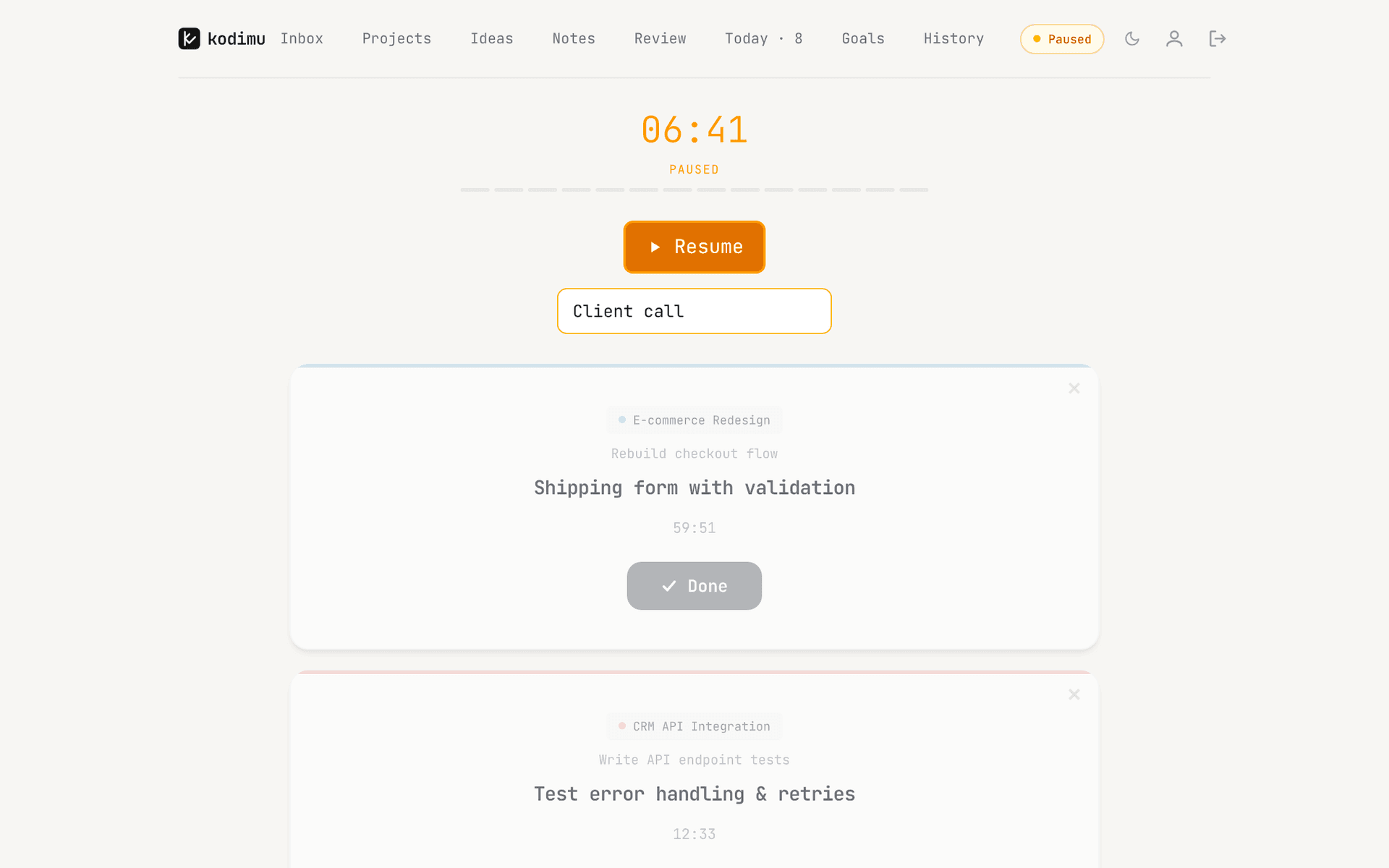
Kodimu records the real time spent on each task. Focus mode runs a count-up Stopwatch by default or an optional Pomodoro mode; pauses can carry a reason and are kept separate from focus time; several tasks can run in parallel. Today shows tasks done, total focus time and sessions, and History keeps the time per completed task. You sign in with email, Google or GitHub — no Microsoft account.
Task text and notes are encrypted in your browser before upload, so the server stores only ciphertext. See the security page.
The catch
No reminders or notifications, which To Do offers. No native apps and no offline mode, no calendar, no Outlook or other integrations, no shared lists, and no import or export. It is hosted on Vercel in the US, not in the EU; metadata such as dates and focus timings is not encrypted. It is a closed-source beta from one developer and has not been audited.
Lunatask
End-to-end encrypted, native apps- Timer
- Task-bound Pomodoro timers
- Platforms
- macOS, Windows, Linux, iOS, Android
- Price
- Free plan; paid Premium
- Encryption
- End-to-end
What makes it stand out
Native apps on Windows, Android and the rest, a free plan, and end-to-end encryption: “We don’t have access to the private key required to decrypt your data.” Timers run for a specific task and sync across devices. Tasks share the app with habits, a journal and notes.
The catch
No web app, so no equivalent of To Do on the web. Closed source, metadata not encrypted, and the timers are countdowns rather than a log of elapsed time. See Lunatask vs Kodimu.
Toggl Track
Mature tracker with light tasks- Timer
- Core product
- Platforms
- Web, Windows, macOS, iOS, Android, extensions
- Price
- Free; Starter US$9/user/mo yearly
- Encryption
- TLS; at rest not stated
What makes it stand out
If you would rather keep a simple list and add serious time tracking, Toggl Track’s free plan includes “Simple planning: Tasks, boards, and task estimates” alongside the timer, on every major platform. It holds ISO 27001 and SOC 2 Type II.
The catch
It is a time tracker with tasks attached, not a to-do app, so a daily list like My Day has no real counterpart. Toggl names Google Cloud and TLS but not encryption at rest, and the free plan’s API has been limited to 20 requests an hour since November 2025. See Toggl Track vs Kodimu.
ClickUp
Native tracking in a team platform- Timer
- Native time tracking
- Price
- Free Forever; Core US$9/user/mo yearly
- Encryption
- TLS 1.2, AES-256 at rest
What makes it stand out
If your To Do lists are really team work, ClickUp keeps tasks and time in one place. Time tracking is a trial on the Free Forever plan and included from Core.
The catch
Far more complex than To Do. Full tracking needs a paid seat, encryption at rest uses keys ClickUp holds, and data residency choices are limited to Enterprise.
Amazing Marvin
Detailed per-task timing- Timer
- Per-task tracking, Pomodoro
- Platforms
- Web, Mac, Windows, iOS, Android
- Price
- US$8/mo or US$96/yr
- Encryption
- HTTPS; at rest not stated
What makes it stand out
Marvin promises to “track exactly how long you spend on each task”, can start tracking automatically in Super Focus Mode and has a built-in Pomodoro. Apps cover web, Mac, Windows, iOS and Android.
The catch
A big step from free: no free plan, just a 14-day trial. The privacy page describes HTTPS but not encryption at rest. See Amazing Marvin alternatives.
Which should you choose
- You want to stay free and keep native apps everywhere → TickTick on the free plan, if its list limits fit.
- You want free, open source and full time tracking → Super Productivity.
- You need end-to-end encryption in native apps → Lunatask.
- You need end-to-end encryption in the browser, without a Microsoft account → Kodimu, if you can do without reminders, mobile apps and export during the beta.
- Time data matters more than the list → Toggl Track.
- Your lists are team projects → ClickUp; you will pay for depth → Amazing Marvin.
How to recreate your To Do workflow in Kodimu
Kodimu has no importer, so copy each To Do list into a Kodimu project with Bulk Add: one task per line, and steps go on the lines below with a leading “-”, which makes them subtasks. Mark what used to be “Important” with the Priority, Important or Urgent badge. Instead of building My Day from suggestions, open Review, which shows every task from every project, and tick what you will do; those tasks land on Today, and unfinished ones prompt you the next morning to keep them or move them to the Queue. Then start Focus with the Stopwatch or Pomodoro and let it record the real time each task takes.
FAQ
- Does Microsoft To Do have time tracking?
- Not that we could find. Microsoft’s To Do pages describe lists, My Day, steps and reminders, but no timer or time log.
- What is the best free Microsoft To Do alternative with a timer?
- Super Productivity is free with full time tracking; TickTick’s free plan includes its Focus stopwatch and Pomodoro. Kodimu is free during its beta, and its pricing may change.
- Is Microsoft To Do end-to-end encrypted?
- No. Tasks are stored in your Exchange Online mailbox and encrypted in transit and at rest with keys Microsoft controls. See our explainer.
- Is there a to-do app with time tracking that does not need a Microsoft account?
- Yes. Super Productivity needs no account at all; TickTick, Lunatask, Toggl Track and Kodimu use their own accounts. Kodimu also supports Google and GitHub sign-in.
- Can I import Microsoft To Do lists into Kodimu?
- No. Paste your task titles into Bulk Add, list by list. Reminders, due dates and notes do not transfer, and Kodimu has no reminders.
Sources
- Microsoft Support — Data storage and compliance in Microsoft To Do — read 2026-10-21
- Microsoft Support — Set up Microsoft To Do — read 2026-10-21
- Microsoft Support — Plan your day with My Day — read 2026-10-21
- Microsoft Support — Welcome to Microsoft To Do — read 2026-10-21
- eperi — Microsoft 365 encryption for Planner and To Do — read 2026-10-21
- AlternativeTo — Microsoft To Do alternatives — read 2026-10-21
- Super Productivity — README on GitHub — read 2026-10-21
- Super Productivity — Privacy — read 2026-10-21
- Super Productivity — Pricing — read 2026-10-21
- TickTick blog — Brand-new Focus experience — read 2026-10-21
- ClickUp — TickTick review — read 2026-10-21
- TickTick — Upgrade / pricing — read 2026-10-21
- TickTick — Security — read 2026-10-21
- Lunatask — Security — read 2026-10-21
- Lunatask — Timers — read 2026-10-21
- Lunatask — Installation — read 2026-10-21
- Toggl Track — Pricing — read 2026-10-21
- Toggl Track — Security and reliability — read 2026-10-21
- Mediaatelier — Toggl free plan limits — read 2026-10-21
- ClickUp — Pricing — read 2026-10-21
- ClickUp — Security — read 2026-10-21
- Amazing Marvin — Home — read 2026-10-21
- Amazing Marvin — Pricing — read 2026-10-21
- Amazing Marvin — Privacy — read 2026-10-21